NETIO
This driver can read the status and send control commands to a NETIO power socket, using the HTTP JSON API protocol with basic authentication (username and password).
NETIO supported models are: PowerCable REST 101x, PowerPDU 4C, PowerPDU 4PS, PowerDIN 4PZ, PowerBOX 3Px, 4, 4All.
Device Configuration
The device should be configured with a static IP address, or a fixed DHCP assigned address.
On the device's configuration page go to section M2M API Protocol and configure JSON API protocol:
- Enable JSON API
- Enable READ
- Enable WRITE
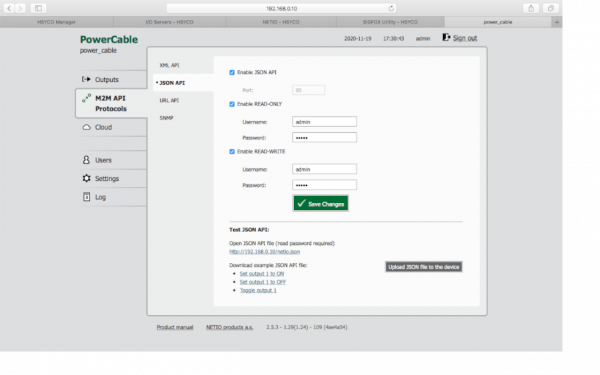
You should change the JSON API username and password.
HSYCO Configuration
Add the NETIO I/O Server in the I/O Servers section of the Settings and set its parameters:
Communication
- IP Address: local IP address of NETIO device
- Port: leave it blank
Authentication
- User: JSON API username, as set with device web configuration page
- Password: JSON API password, as set with device web configuration page
Options
| ID | Default | Values | Description |
|---|---|---|---|
| startupevents | false | true | generate IO events also during the driver’s start-up phase |
| false | start generating events only after HSYCO is aligned with the current status of the system | ||
| pollinterval | 1000 | 100 ... 30000 | data acquisition interval, in milliseconds, from the power socket |
Datapoints
| ID | Value | R/W | Description | ||||||||||||||||||||||||||||||||||||||||||||||||||||||||||||||||||||||||||||||||||||||||||||||||||||||||||||||||||||||||
|---|---|---|---|---|---|---|---|---|---|---|---|---|---|---|---|---|---|---|---|---|---|---|---|---|---|---|---|---|---|---|---|---|---|---|---|---|---|---|---|---|---|---|---|---|---|---|---|---|---|---|---|---|---|---|---|---|---|---|---|---|---|---|---|---|---|---|---|---|---|---|---|---|---|---|---|---|---|---|---|---|---|---|---|---|---|---|---|---|---|---|---|---|---|---|---|---|---|---|---|---|---|---|---|---|---|---|---|---|---|---|---|---|---|---|---|---|---|---|---|---|---|---|---|
| connection | online | R | the power socket is online and the driver is receiving data from it | ||||||||||||||||||||||||||||||||||||||||||||||||||||||||||||||||||||||||||||||||||||||||||||||||||||||||||||||||||||||||
| offline | R | initialization of the driver failed or loop cycle failed | |||||||||||||||||||||||||||||||||||||||||||||||||||||||||||||||||||||||||||||||||||||||||||||||||||||||||||||||||||||||||
| o<n> | on | W | turn on output <n> | ||||||||||||||||||||||||||||||||||||||||||||||||||||||||||||||||||||||||||||||||||||||||||||||||||||||||||||||||||||||||
| off | W | turn off output <n> | |||||||||||||||||||||||||||||||||||||||||||||||||||||||||||||||||||||||||||||||||||||||||||||||||||||||||||||||||||||||||
| flip | W | power switch on output <n> | |||||||||||||||||||||||||||||||||||||||||||||||||||||||||||||||||||||||||||||||||||||||||||||||||||||||||||||||||||||||||
| 0 | R | output <n> is off | |||||||||||||||||||||||||||||||||||||||||||||||||||||||||||||||||||||||||||||||||||||||||||||||||||||||||||||||||||||||||
| W | turn off output <n> | ||||||||||||||||||||||||||||||||||||||||||||||||||||||||||||||||||||||||||||||||||||||||||||||||||||||||||||||||||||||||||
| 1 | R | output <n> is on | |||||||||||||||||||||||||||||||||||||||||||||||||||||||||||||||||||||||||||||||||||||||||||||||||||||||||||||||||||||||||
| W | turn on output <n> | ||||||||||||||||||||||||||||||||||||||||||||||||||||||||||||||||||||||||||||||||||||||||||||||||||||||||||||||||||||||||||
| off& | W | turn off output <n> for a short time (short off) | |||||||||||||||||||||||||||||||||||||||||||||||||||||||||||||||||||||||||||||||||||||||||||||||||||||||||||||||||||||||||
off&| W | turn off output <n> for <t> milliseconds | on& | W | turn on output <n> for a short time (short on) | on& | W | turn on output <n> for <t> milliseconds | model | <text> | R | device model | fwversion | <text> | R | firmware version | jsonversion | <text> | R | JSON protocol version | name | <text> | R | device name | macaddress | <text> | R | device MAC address | serialnum | <text> | R | device serial number | uptime | <val> | R | time, in minutes, since device startup | numoutputs | <n> | R | number of device outputs | numinputs | <n> | R | number of device inputs | voltage | <val> | R | instantaneous device voltage, in Volt | frequency | <val> | R | instantaneous device frequency, in Hertz | totcurrent | <val> | R | instantaneous total current through all power outputs, in milliampere | opf | <val> | R | instantaneous True Power Factor weighted average from all meters | phase | <val> | R | instantaneous phase weighted average from all meters | totload | <val> | R | total power of all power outputs, in Watt | totenergy | <val> | R | instantaneous value of the Total Energy counter (Wh) | o<n>.name | <text> | R | output <n> name, defined in web configuration page | o<n>.delay | <val> | R | output <n> delay for short On/Off, in milliseconds | o<n>.current | <val> | R | instantaneous current of output <n>, in milliampere | o<n>.pf | <val> | R | instantaneous True Power Factor of output <n> | o<n>.phase | <val> | R | instantaneous phase of output <n> | o<n>.load | <val> | R | total power of output <n> | o<n>.energy | <val> | R | instantaneous value of the energy counter of output <n> (Wh) | o<n>.rvenergy | <val> | R | instantaneous value of the reverse energy counter of output <n> (Wh) | i<n> | 1 | R | input <n> is on | 0 | R | input <n> is off | i<n>.name | <text> | R | input <n> name, defined in web configuration page | i<n>.s0counter | <val> | R | s0 counter value of input <n> | |
Release Notes
3.8.0
- initial release
NETIO is a registered trademark of NETIO Products a.s.