KNX
The KNX I/O Server provides for the control of a KNX installation compliant with the KNX Standard version 3.0.
The communication between HSYCO and the KNX network can employ either of the two KNXnet/IP services:
- Tunneling: HSYCO connects to a KNXnet/IP gateway (the default mode).
- Routing: HSYCO joins the KNXnet/IP routing multicast group and acts as a KNX IP device on the IP backbone, with no gateway to connect to. Set the routing option to enable it.
Both services can be used in plain or in KNX IP Secure mode (secure tunneling and secure routing), using the keys exported by ETS in a keyring (.knxkeys) file. See KNX IP Secure.
The KNX framework must be programmed to work properly using the ETS tool.
Each defined KNX group is seen as a datapoint whose value is formatted with respect to its DPT type. Supported DPT types range from DPT 1 to DPT 30, plus DPT 232, 245 and 251. Moreover, it is possible to have virtual datapoints that link a set of datapoints used for the control of devices such as lights, dimmers, RGB and RGBW lights, automations and thermostats which require several KNX groups for commands and feedback.
HSYCO Configuration
Add a KNX I/O Server in the I/O Servers section of the Settings and set its parameters:
Communication
- IP Address: IP address of the KNX/IP gateway. Not used when the routing option is set to true
- IP Port: TCP/IP port to use, leave blank to use default port 3671.
High Availability
- Shutdown when inactive: defaults to false.
Options
| ID | Default | Values | Description |
|---|---|---|---|
| startupevents | false | true | generate IO events also during the driver’s start-up phase |
| false | start generating events only after HSYCO is aligned with the current status of the system | ||
| discovery | true | true | keep the state of the DPT 1 datapoints and of the virtual datapoints up to date in the devices list, so that the (button) objects linked to them are automatically updated. Should be enabled |
| false | the devices' states are not updated. The datapoints are still added to the catalog.json list when the I/O Server starts | ||
| fromevents | false | true | generate events for commands sent on the KNX BUS reporting the source address and the value of the command |
| false | disable command events | ||
| readaftercommand | false | true | force the driver to read the value of a datapoint after a command is sent to it |
| false | the driver will assume that commands detected on the BUS are always successful, thus no re-reading is performed to set the value of a datapoint | ||
| localport | <port_number> | the port number used locally by HSYCO to communicate with the KNXnet/IP gateway. This option might be necessary when employing network address translation (NAT) | |
| localhost | <address>:<port> | the local IP address and port used by HSYCO. Use it to bind the driver to a specific network interface on multi-homed systems; in routing mode this is also the interface that joins the multicast group | |
| initreadinterval | 0 | <milliseconds> | Time interval, in milliseconds, between datapoint values reading requests during the initialization phase |
| decimals | 1 | <0..9> | Change the number of decimal digits. Floating point numbers are rounded. |
| routing | false | true | use the KNXnet/IP Routing service: HSYCO joins the routing multicast group instead of connecting to a gateway. The individualaddress option is required in this mode |
| false | use the KNXnet/IP Tunneling service, connecting to the gateway set in the Communication settings | ||
| multicast | 224.0.23.12:3671 | <address>[:<port>] | the routing multicast group address, and optionally the port. Only used when routing is true |
| individualaddress | <x.y.z> | the KNX individual address HSYCO uses as the source address of the frames it sends (e.g. 1.1.250). It is required when routing is true, and it must be an address that is free on the KNX installation. In tunneling mode the gateway-assigned address takes precedence, but this option is used as the fallback source address for KNX Data Secure telegrams | |
| securemode | auto | auto | use KNX IP Secure if the gateway requires it (tunneling), or if a backbone key is available in the keyring (routing) |
| plain | never use KNX IP Secure. The connection fails if the gateway only accepts secure tunneling | ||
| secure | always use KNX IP Secure. The connection fails if the gateway does not support it, or if no key is available | ||
| keyringfile | <file_path> | path of the ETS keyring (.knxkeys) file holding the KNX IP Secure keys | |
| keyringpassword | <password> | password of the keyring file, as set in ETS when exporting it |
Datapoints Declaration
It is required to provide the I/O Server with the KNX framework configuration. To this end, the KNX Utility provides a graphical interface to import ETS4, ETS5 or ETS6 project files and to configure the datapoints.
It is also possible to manually define the datapoints in the topology.txt file of the I/O Server.
KNX IP Secure
KNX IP Secure protects the KNXnet/IP communication between HSYCO and the KNX installation, both for tunneling (secure tunnel over TCP) and for routing (secure group communication on the multicast backbone).
All the keys are read from the keyring file that ETS generates when exporting the project's security data ("Export Keyring" in the ETS Security report). Copy the .knxkeys file to the HSYCO controller and set the keyringfile and keyringpassword options.
The securemode option selects if and when the secure protocol is used:
- auto (default): in tunneling mode HSYCO reads the gateway's capabilities during the connection phase and uses secure tunneling only if the gateway requires it; in routing mode HSYCO uses secure routing if the keyring contains a backbone key. This is the recommended setting, as it matches the ETS project configuration with no further options
- plain: KNX IP Secure is never used. If the gateway only accepts secure tunneling the connection fails with an error in the log
- secure: KNX IP Secure is always used. The connection fails if the gateway does not offer secure tunneling, or if the keyring provides no key
Secure tunneling
HSYCO selects the tunnel channel to use automatically: it intersects the tunnel interfaces the keyring associates to the gateway with the channels the gateway reports as free and usable. If several channels are available, the one with the lowest user ID is used, and the choice is reported in the log. The user password and the device authentication code of the selected channel are taken from the keyring.
Secure routing
Secure routing requires the backbone key, which is present in the keyring only if the ETS project has security enabled on the IP backbone.
The individualaddress option must be set to an individual address that is not used by any other device on the installation. HSYCO refuses to start if that address is also listed in the keyring, either as a tunnel interface or as a device address.
Secure routing frames carry a multicast group timer that HSYCO must synchronize with the other devices on the backbone. When the timer is not yet synchronized, the initial read of the datapoints is deferred until a peer's timer notification is received, and the driver reports it in the log.
The driver also handles the routing flow control messages: if busy, it pauses the transmission of commands for the time requested by the busy device, and it logs the lost message notifications with the cumulative count of the lost frames.
KNX Data Secure, the application-layer encryption of individual group objects, is supported for group communication over every connection mode (plain or secure, tunneling or routing). If the keyring contains group keys, HSYCO automatically sends and receives secured telegrams on those group addresses and logs "Data Secure enabled" at start-up; group addresses without keys keep working in plain text. Plain telegrams received on a secured group address are dropped, as required by the KNX specification. In plain tunneling, secured telegrams use the gateway-assigned tunnel address (or the configured individualaddress option); if neither is available, secured writes are dropped and logged. Secured point-to-point device management and sync services are not supported.
Gateway Discovery
In tunneling mode HSYCO always sends a KNXnet/IP search request to the gateway before connecting, to read its individual address, its friendly name, its tunnel channels and its security capabilities. This is what allows the securemode auto behavior, and it is reported in the log.
To list all the KNXnet/IP gateways available on the network, write any value to the discover datapoint of the I/O Server. HSYCO browses the multicast group and logs, for each gateway found, its individual address, friendly name, control endpoint, whether it requires secure tunneling, and the number of tunnel channels it exposes.
Datapoints
| ID | Value | R/W | Description |
|---|---|---|---|
| connection | online | R | connection established to the gateway and initial reading executed |
| offline | R | HSYCO can't connect to the gateway | |
| <datapoint_id> | <value> | R | this datapoint has value <value> |
| W | set this datapont to value <value> | ||
| <datapoint_id> | read | W | force to read the value of the dp |
| <datapoint_id>.from.<source> | <value> | R | a command with value <value> from the device with individual address <source> has been sent to the addressed datapoint. The source address has the format “x.y.z” (e.g. 1.2.87). Only generated when the fromevents option is true |
| light.<n> | 0 | R | the light is off |
| 0 | off | W | turn off the light | |
| 1 | R | the light is on | |
| 1 | on | W | turn on the light | |
| flip | W | invert the state of the light | |
| unknown | R | the state of the light is unknown | |
| dimmer.<n> | off | R | the dimmer is off |
| W | turn off the dimmer | ||
| on | W | turn on the dimmer | |
| flip | W | invert the state of the dimmer | |
| 1% ... 100% | R | the dimming level is set to the reported level | |
| 0% ... 100% | W | set the dimming level to the specified value | |
| +<n> | -<n> | W | relative dimming of <n> = {1 ... 7} steps up or down, sent to the step command datapoint (see DPT 3). Ignored when no step command datapoint is defined | |
| unknown | R | the state of the dimmer is unknown | |
| rgb.<n> | <r>,<g>,<b> | R | the color of the light (e.g. "255,0,0" corresponds to red), whether it is on or off. An RGBW light reports its white channel as a fourth value, <r>,<g>,<b>,<w>. See Color Devices |
| W | set the color of the light. The state is not changed. Commas, semicolons, asterisks or spaces are all accepted as separators, and a channel can also be a percentage of full output, as "50%". On an RGBW light the three color channels can be written alone, keeping the white | ||
| <r>,<g>,<b>,on | W | set the color and the state in one write, with on or off as the last field | |
| 0,0,0 | W | ignored: all zeros is not a color. Use off to turn the light off | |
| on | W | turn on the light, at the color it is holding | |
| off | W | turn off the light. The color is not changed | |
| flip | W | invert the state of the light | |
| unknown | R | the state of the light is unknown, because no feedback datapoint has reported yet | |
| rgb.<n>.white | 1 ... 255 | R | the white channel of the light is lit at the reported value. Only defined for an RGBW light |
| off | R | the light is off, or its white channel is at zero | |
| unknown | R | the state of the light is unknown | |
| 1 ... 255 | W | set the white channel to the specified value, or to a percentage of full output as "50%", and turn on the light | |
| 0 | W | turn off the light. The white channel is not changed | |
| on | off | flip | W | switch the light, exactly as the same word written to rgb.<n> does | |
| rgb.<n>.on | 1 | R | the light is on |
| 0 | R | the light is off | |
| unknown | R | the state of the light is unknown | |
| rgb.<n>.fault | 1 | R | the I/O Server cannot reach the KNX bus. The light keeps its color and its state, and the user interface raises its fault flag over them |
| 0 | R | the bus is reachable | |
| autom.<n> | up | W | move the automation upwards |
| down | W | move the automation downwards | |
| stop | W | stop the automation | |
| flip | W | stop the automation if it is moving, otherwise start it in the direction opposite to the last movement | |
| if use position = false | |||
| up | R | the automation is moving upwards | |
| down | R | the automation is moving downwards | |
| offup | R | the automation is stopped in an open position | |
| offdown | R | the automation is stopped in the closed position | |
| if use position = true | |||
| 0% ... 100% | R | the automation is stopped at the reported position | |
| 0%+ ... 100%+ | R | the automation is at the reported position and is closing | |
| 0%- ... 100%- | R | the automation is at the reported position and is opening | |
| W | move the automation to the specified position | ||
| unknown | R | the state of the automation is unknown | |
| thermo.<n> .setpoint.temp | <float_value> | W | set the setpoint to the specified value |
| up | W | increase the setpoint by 0.5 | |
| down | W | decrease the setpoint by 0.5 | |
| thermo.<n> .setpoint | mode | W | switch to the next setpoint mode |
| thermo.<n> .setpoint.mode | comf | R | the setpoint mode of the thermostat is set to "comfort" |
| stb | R | the setpoint mode of the thermostat is set to "stand-by" | |
| night | R | the setpoint mode of the thermostat is set to "night" | |
| <label> | R | the setpoint mode of the thermostat is set to the mode with label <label>, in lower case, when the modes are redefined with the setpoint.mode.values and setpoint.mode.labels attributes in topology.txt | |
| unknown | R | the setpoint mode of the thermostat is unknown | |
| discover | <any> | W | browse the network for KNXnet/IP gateways and report the ones that are found in the log |
Color Devices
An RGB virtual datapoint holds a color and an on/off state, and the two are independent. A light with a white channel, an RGBW light, holds the white as well, published as a level of its own: see White channel.
Turning a light off does not change its color: rgb.<n> always reports the color the light is showing, or the color it will show when it is turned back on, so the user interface can display it either way. The state is reported separately, on rgb.<n>.on, and is taken from the fb.onoff feedback datapoint when one is declared. When it is not, the state is taken from the color datapoint itself, where the bus writes off as an all zero color — but the color is kept even then, and on an RGBW light a white above zero reads as on in the same way.
Setting a color never turns a light on. The state changes only when it is written: with on, off or flip, on the rgb.<n>.on datapoint or on the light's own, or by adding on or off as a last field to a color, which sets both in one write.
IO knx.rgb.1 = 255,67,31        # set the color, on or off as it was
IO knx.rgb.1 = 255,67,31,on     # set the color and turn it on
IO knx.rgb.1 = on               # turn it on, at the color it is holding
A color of all zeros is not a color, and is ignored, so the stored color is never lost and a color that shows nothing while the light is on cannot be constructed. An on or off written as the last field still applies.
rgb.<n> reports the color comma separated, the same as every other I/O Server that publishes a color, so a value read from one can be written straight to a KNX light. Writing accepts a comma, a semicolon, an asterisk or spaces as the separator, and each channel is a number from 0 to 255 or a percentage of full output such as 50%. An RGBW light reports and accepts a fourth channel, the white one.
The DPT 232 or DPT 251 group address behind the virtual datapoint reports its value comma separated as well: see Datapoint types and values.
Switching a light on writes the cmd.onoff command datapoint when one is declared. When it is not, it writes the color the light was last showing to cmd.rgb, and the white to cmd.white when the white has a datapoint of its own, so the light comes back to its own color; switching it off writes an all zero color to the same datapoints.
rgb.<n> reports unknown until fb.rgb, or fb.white, reports for the first time, and a light declared with command datapoints only keeps reporting unknown, as it always has. A light with fb.onoff but no fb.rgb knows its state, reported on rgb.<n>.on, but not its color.
White channel
A light with a white channel is declared in one of two ways, following how the KNX device exposes it:
- the color datapoints are DPT 251, and the white channel travels in the color telegram together with the red, green and blue ones
- the color datapoints are DPT 232, and the white channel has a group object of its own, declared as the fb.white and cmd.white datapoints, of type DPT 5
fb.rgb and cmd.rgb must be of the same type: a light is an RGB one or an RGBW one, never one of each.
However it is wired, the white is published on rgb.<n>.white, a level of its own that a slider or a knob can be bound to, and rgb.<n> reports it as a fourth channel, <r>,<g>,<b>,<w>. A write to rgb.<n> carries the four channels, or the three color ones alone, which sets the color and keeps the white.
rgb.<n>.white reads as a level rather than as a color: on, off and flip are the words it accepts, as a number is the value of the channel. A value above zero lights the white and turns the light on, the way a slider brings a light that is off back up, while a zero turns the light off and keeps the white it comes back to. The datapoint reports the value of the channel while the light is on, and off while the light is off or the white is at zero.
Faults
rgb.<n>.fault is set while the I/O Server cannot reach the KNX bus, and adds a fault field to the value the light is published with in the catalog, <r>*<g>*<b>*<on|off>*fault, which is what makes the user interface raise its fault flag over it. The white channel of an RGBW light carries the same field. Nothing else changes: the color and the state are left in place, so an interface still shows the light as it was last reported. The flag is cleared as soon as the connection is back.
Datapoint types and values
The KNX I/O Server supports all datapoint types (DPTs) listed in the following paragraphs.
The value of a datapoint is formatted with respect to its DPT main number. The actual behavior of the datapoint is anyhow dependent on its complete type (i.e. main number and sub number). Examples for the most common cases will be provided, but for a complete reference of all available datapoint types and allowed values we strongly advice to refer to chapter 3/7/2 of the KNX Standard v2.0.
The following paragraphs will show the KNX data format for each DPT as described in the protocol as well as the allowed datapoint values and the corresponding conversion.
Datapoint Type 1 (1 bit, Boolean)
KNX bit-level format:
| 8 | 7 | 6 | 5 | 4 | 3 | 2 | 1 |
|---|---|---|---|---|---|---|---|
| b |
b = {0, 1}
Datapoint values:
| Value | Converts to |
|---|---|
| 0 | b = 0 |
| 1 | b = 1 |
Example:
For a datapoint with DPT 1.001 (e.g. a switch) a value of '0' corresponds to the 'off' state, while for a datapoint with DPT 1.007 (e.g. a step indicator for a dimmer) it would correspond to the state 'decrease'.
Datapoint Type 2 (2 bits, Control)
KNX bit-level format:
| 8 | 7 | 6 | 5 | 4 | 3 | 2 | 1 |
|---|---|---|---|---|---|---|---|
| c | v |
c = {0, 1}, v = {0, 1}
Datapoint values:
| Value | Converts to |
|---|---|
| disabled | c = 0, v = 0 |
| 0 | c = 1, v = 0 |
| 1 | c = 1, v = 1 |
Datapoint Type 3 (4 bits, Dimming, Blinds)
KNX bit-level format:
| 8 | 7 | 6 | 5 | 4 | 3 | 2 | 1 |
|---|---|---|---|---|---|---|---|
| c | step[2] | step[1] | step[0] |
c = {0, 1}, step = [000b ... 111b]
Datapoint values:
| Value | Converts to |
|---|---|
| -7 ≤ v < 0 | c = 0, step = |v| |
| 0 ≤ v ≤ 7 | c = 1, step = v |
Example:
For a datapoint with DPT 3.007 (control dimming) a value of '3' corresponds to a 3-steps light increase. The same value for a DPT 3.008 (control blinds) datapoint corresponds to a 3-steps downwards movement. In both cases a value of '0' indicates the 'break' state.
Datapoint Type 4 (8 bit, Character set)
KNX bit-level format:
| 8 | 7 | 6 | 5 | 4 | 3 | 2 | 1 |
|---|---|---|---|---|---|---|---|
| char[7] | char[6] | char[5] | char[4] | char[3] | char[2] | char[1] | char[0] |
char = [0 ... 255] (ISO 8859-1 encoding of a character)
Datapoint values:
| Value | Converts to |
|---|---|
| 0 ≤ v ≤ 255 | char = v |
A DPT 4.001 datapoint will only support the values corresponding to ASCII characters (a subset of the ISO 8859-1 standard values), thus only values ranging from 0 to 127 are allowed.
Datapoint Type 5 (8 bits, Unsigned Value)
KNX bit-level format:
| 8 | 7 | 6 | 5 | 4 | 3 | 2 | 1 |
|---|---|---|---|---|---|---|---|
| val[7] | val[6] | val[5] | val[4] | val[3] | val[2] | val[1] | val[0] |
val = [0 ... 255]
Datapoint values:
| Value | Converts to |
|---|---|
| 0 ≤ v ≤ 255 | val = v |
Example:
For a datapoint with DPT 5.001 (scaling) a value of '255' corresponds to '100%'. For a datapoint with DPT 5.003 (angle) the same value corresponds to '360°'.
Datapoint Type 6 (8 bits, Signed Value)
KNX bit-level format:
| 8 | 7 | 6 | 5 | 4 | 3 | 2 | 1 |
|---|---|---|---|---|---|---|---|
| val[7] | val[6] | val[5] | val[4] | val[3] | val[2] | val[1] | val[0] |
val = [-128 ... 127] (two’s complement notation)
Datapoint values:
| Value | Converts to |
|---|---|
| -128 ≤ v ≤ 127 | val = v |
Datapoint Type 7 (2 Bytes, Unsigned Value)
KNX bit-level format:
| 16 | 15 | 14 | 13 | 12 | 11 | 10 | 9 | 8 | 7 | 6 | 5 | 4 | 3 | 2 | 1 |
|---|---|---|---|---|---|---|---|---|---|---|---|---|---|---|---|
| val[15] | val[14] | val[13] | val[12] | val[11] | val[10] | val[9] | val[8] | val[7] | val[6] | val[5] | val[4] | val[3] | val[2] | val[1] | val[0] |
val = [0 ... 65535]
Datapoint values:
| Value | Converts to |
|---|---|
| 0 ≤ v ≤ 65535 | val = v |
Datapoint Type 8 (2 Bytes, Signed Value)
KNX bit-level format:
| 16 | 15 | 14 | 13 | 12 | 11 | 10 | 9 | 8 | 7 | 6 | 5 | 4 | 3 | 2 | 1 |
|---|---|---|---|---|---|---|---|---|---|---|---|---|---|---|---|
| val[15] | val[14] | val[13] | val[12] | val[11] | val[10] | val[9] | val[8] | val[7] | val[6] | val[5] | val[4] | val[3] | val[2] | val[1] | val[0] |
val = [-32768 ... 32767] (two’s complement notation)
Datapoint values:
| Value | Converts to |
|---|---|
| -32768 ≤ v ≤ 32767 | val = v |
Datapoint Type 9 (2 Bytes, Float Value)
KNX bit-level format:
| 16 | 15 | 14 | 13 | 12 | 11 | 10 | 9 | 8 | 7 | 6 | 5 | 4 | 3 | 2 | 1 |
|---|---|---|---|---|---|---|---|---|---|---|---|---|---|---|---|
| m | e[3] | e[2] | e[1] | e[0] | m[10] | m[9] | m[8] | m[7] | m[6] | m[5] | m[4] | m[3] | m[2] | m[1] | m[0] |
e = [0 ... 15], m = [-2048 ... 2047] (two’s complement notation)
float value = (0.01 * m) * 2^e = [-671088.64 ... 670760.96]
Datapoint values:
| Value | Converts to |
|---|---|
| -671088.64 ≤ v ≤ 670760.96 | float value = v |
Datapoint Type 10 (3 Bytes, Time)
KNX bit-level format:
| 24 | 23 | 22 | 21 | 20 | 19 | 18 | 17 | 16 | 15 | 14 | 13 | 12 | 11 | 10 | 9 | 8 | 7 | 6 | 5 | 4 | 3 | 2 | 1 |
|---|---|---|---|---|---|---|---|---|---|---|---|---|---|---|---|---|---|---|---|---|---|---|---|
| day[2] | day[1] | day[0] | hour[4] | hour[3] | hour[2] | hour[1] | hour[0] | 0 | 0 | min[5] | min[4] | min[3] | min[2] | min[1] | min[0] | 0 | 0 | sec[5] | sec[4] | sec[3] | sec[2] | sec[1] | sec[0] |
day = [0 ... 7] (0 = no day, 1 = Monday, ..., 7 = Sunday)
hour = [0 ... 23]
min = [0 ... 59]
sec = [0 ... 59]
Datapoint values:
| Value | Converts to |
|---|---|
| <day>.<hour>.<minutes>.<seconds> | day = <day>, hour = <hour>, min = <min>, sec = <sec> |
Example:
A value of '2.12.46.23' corresponds to 'Tuesday 12:46:23'.
Datapoint Type 11 (3 Bytes, Date)
KNX bit-level format:
| 24 | 23 | 22 | 21 | 20 | 19 | 18 | 17 | 16 | 15 | 14 | 13 | 12 | 11 | 10 | 9 | 8 | 7 | 6 | 5 | 4 | 3 | 2 | 1 |
|---|---|---|---|---|---|---|---|---|---|---|---|---|---|---|---|---|---|---|---|---|---|---|---|
| 0 | 0 | 0 | day[4] | day[3] | day[2] | day[1] | day[0] | 0 | 0 | 0 | 0 | month[3] | month[2] | month[1] | month[0] | 0 | year[6] | year[5] | year[4] | year[3] | year[2] | year[1] | year[0] |
day = [1 ... 31]
month = [1 ... 12]
year = [0 ... 99] (if ≥ 90 interpret as 20th century, otherwise interpret as 21st century)
Datapoint values:
| Value | Converts to | |
|---|---|---|
| <year>/<month>/<day> | (1990 ≤ <year> ≤ 2089) | year = last two digits of <year>, month = <month>, day = <day> |
Example:
A value of '2011/2/8' corresponds to 'February 8th 2011'.
Datapoint Type 12 (4 Bytes, Unsigned Value)
KNX bit-level format:
| 32 | 31 | 30 | 29 | 28 | 27 | 26 | 25 | 24 | 23 | 22 | 21 | 20 | 19 | 18 | 17 | 16 | 15 | 14 | 13 | 12 | 11 | 10 | 9 | 8 | 7 | 6 | 5 | 4 | 3 | 2 | 1 |
|---|---|---|---|---|---|---|---|---|---|---|---|---|---|---|---|---|---|---|---|---|---|---|---|---|---|---|---|---|---|---|---|
| val[31] | val[30] | val[29] | val[28] | val[27] | val[26] | val[25] | val[24] | val[23] | val[22] | val[21] | val[20] | val[19] | val[18] | val[17] | val[16] | val[15] | val[14] | val[13] | val[12] | val[11] | val[10] | val[9] | val[8] | val[7] | val[6] | val[5] | val[4] | val[3] | val[2] | val[1] | val[0] |
val = [0 ... 4294967295]
Datapoint values:
| Value | Converts to |
|---|---|
| 0 ≤ v ≤ 4294967295 | val = v |
Datapoint Type 13 (4 Bytes, Signed Value)
KNX bit-level format:
| 32 | 31 | 30 | 29 | 28 | 27 | 26 | 25 | 24 | 23 | 22 | 21 | 20 | 19 | 18 | 17 | 16 | 15 | 14 | 13 | 12 | 11 | 10 | 9 | 8 | 7 | 6 | 5 | 4 | 3 | 2 | 1 |
|---|---|---|---|---|---|---|---|---|---|---|---|---|---|---|---|---|---|---|---|---|---|---|---|---|---|---|---|---|---|---|---|
| val[31] | val[30] | val[29] | val[28] | val[27] | val[26] | val[25] | val[24] | val[23] | val[22] | val[21] | val[20] | val[19] | val[18] | val[17] | val[16] | val[15] | val[14] | val[13] | val[12] | val[11] | val[10] | val[9] | val[8] | val[7] | val[6] | val[5] | val[4] | val[3] | val[2] | val[1] | val[0] |
val = [-2147483648 ... 2147483647] (two’s complement notation)
Datapoint values:
| Value | Converts to |
|---|---|
| -2147483648 ≤ v ≤ 2147483647 | val = v |
Datapoint Type 14 (4 Bytes, Float Value)
KNX bit-level format:
| 32 | 31 | 30 | 29 | 28 | 27 | 26 | 25 | 24 | 23 | 22 | 21 | 20 | 19 | 18 | 17 | 16 | 15 | 14 | 13 | 12 | 11 | 10 | 9 | 8 | 7 | 6 | 5 | 4 | 3 | 2 | 1 |
|---|---|---|---|---|---|---|---|---|---|---|---|---|---|---|---|---|---|---|---|---|---|---|---|---|---|---|---|---|---|---|---|
| s | e[7] | e[6] | e[5] | e[4] | e[3] | e[2] | e[1] | e[0] | f[22] | f[21] | f[20] | f[19] | f[18] | f[17] | f[16] | f[15] | f[14] | f[13] | f[12] | f[11] | f[10] | f[9] | f[8] | f[7] | f[6] | f[5] | f[4] | f[3] | f[2] | f[1] | f[0] |
s = {0, 1}, e = [0 .. 255], f = [0 ... 8388607]
float value = 0, [1.40129846432481707E-45, 3.40282346638528860E+38] (IEEE 754 floating point format)
Datapoint values:
| Value | Converts to |
|---|---|
| v = 0 | 1.40129846432481707E-45 ≤ v ≤ 3.40282346638528860E+38 | float value = v |
Datapoint Type 15 (4 Bytes, Access)
KNX bit-level format:
| 32 | 31 | 30 | 29 | 28 | 27 | 26 | 25 | 24 | 23 | 22 | 21 | 20 | 19 | 18 | 17 | 16 | 15 | 14 | 13 | 12 | 11 | 10 | 9 | 8 | 7 | 6 | 5 | 4 | 3 | 2 | 1 |
|---|---|---|---|---|---|---|---|---|---|---|---|---|---|---|---|---|---|---|---|---|---|---|---|---|---|---|---|---|---|---|---|
| d6[3] | d6[2] | d6[1] | d6[0] | d5[3] | d5[2] | d5[1] | d5[0] | d4[3] | d4[2] | d4[1] | d4[0] | d3[3] | d3[2] | d3[1] | d3[2] | d2[3] | d2[2] | d2[1] | d2[0] | d1[3] | d1[2] | d1[1] | d1[0] | e | p | d | c | index[3] | index[2] | index[1] | index[0] |
d1, d2, d3, d4, d5, d6 = [0 ... 9]
index = [0 ... 15]
e = {0, 1} (0 = no error, 1 = reading of access information was not successful)
p = {0, 1} (0 = not accepted, 1 = accepted)
d = {0, 1} (0 = left to right, 1 = right to left)
c = {0, 1} (0 = no encryption, 1 = access information encrypted)
Datapoint values:
| Value | Converts to |
|---|---|
| <d6>.<d5>.<d4>.<d3>.<d2>.<d1>.<e>.<p>.<d>.<c>.<index> | d6 = <d6>, d5 = <d5>, d4 = <d4>, d3 = <d3>, d2 = <d2>, d1 = <d1>, e = <e>, p = <p>, d = <d>, c = <c>, index = <index> |
Example:
A valid value would be: '1.2.3.4.5.7.0.1.0.0.13'
Datapoint Type 16 (14 Bytes, String)
112 111 110 109 108 107 106
| 105 | ... | 8 7 6 5 4 3 2 1 |
|---|---|---|
| char1 | ... | char 14 |
These Datapoint Types are used to transmit strings of textual characters. The length is fixed to 14 octets. The contents are filled starting from the most significant octet. Each octet shall be encoded as specified for the chosen character set. If the string to be transmitted is smaller than 14 octets, unused trailing octets in the character string shall be set to NULL (00H).
Example: KNX is OK is encoded as follows: 4B 4E 58 20 69 73 20 4F 4B 00 00 00 00 00
Datapoint values:
| Value | Converts to | |
|---|---|---|
| <string> | (max 14 bytes) | ISO 8859-1 encoded bytes padded with trailing NULL bytes |
Example:
A valid value would be: 'Hello world'
Datapoint Type 17 (1 Byte, Scene Number)
KNX bit-level format:
| 8 | 7 | 6 | 5 | 4 | 3 | 2 | 1 |
|---|---|---|---|---|---|---|---|
| 0 | 0 | sn[5] | sn[4] | sn[3] | sn[2] | sn[1] | sn[0] |
Datapoint values:
| Value | Converts to |
|---|---|
| 0 ≤ v ≤ 63 | sn = v |
Datapoint Type 18 (1 Byte, Scene Control)
KNX bit-level format:
| 8 | 7 | 6 | 5 | 4 | 3 | 2 | 1 |
|---|---|---|---|---|---|---|---|
| c | 0 | sn[5] | sn[4] | sn[3] | sn[2] | sn[1] | sn[0] |
c = {0, 1} (0 = activate the scene, 1 = learn the scene)
sn = [0 ... 63]
Datapoint values:
For this case the datapoint syntax is slightly different. The scene number (sn) must be suffixed to the datapoint ID as follows: <datapoint_id>.<scene_number>.
| Value | Converts to |
|---|---|
| record | c = 1 |
| 1 | c = 0 |
Example:
The activation of scenario 12 on a datapoint would correspond to: <datapoint_id>.12 = 1
Datapoint Type 19 (8 Bytes, Date with Time)
KNX bit-level format:
| 64 | 63 | ... | 57 | 56 | 55 | ... | 49 | 48 | 47 | ... | 41 | 40 | 39 | ... | 35 | 34 | 33 | ... | 25 | 24 | ... | 17 | 16 | ... | 9 | 8 | ... | 2 | 1 |
|---|---|---|---|---|---|---|---|---|---|---|---|---|---|---|---|---|---|---|---|---|---|---|---|---|---|---|---|---|---|
| Year | Month | Day | DoW | Hour | Min | Sec | F | Res | Res |
Year = [0 ... 255] (Year - 1900)
Month = [1 ... 12]
Day = [1 ... 31]
DoW = [0 ... 7] (Day of Week: 0 = no day, 1 = Monday ... 7 = Sunday)
Hour = [0 ... 23]
Min = [0 ... 59]
Sec = [0 ... 59]
F = {0, 1} (Fault: 0 = Normal, 1 = Fault)
Res = Reserved
Datapoint values:
| Value | Converts to |
|---|---|
| <YYYY>-<MM>-<DD> <HH>:<mm>:<ss> | Standard timestamp format |
Example:
A value of 2023-10-25 14:30:00 corresponds to October 25th, 2023 at 14:30:00.
Datapoint Type 20 (1 Byte, Integer)
KNX bit-level format:
| 8 | 7 | 6 | 5 | 4 | 3 | 2 | 1 |
|---|---|---|---|---|---|---|---|
| mode[7] | mode[6] | mode[5] | mode[4] | mode[3] | mode[2] | mode[1] | mode[0] |
mode = [0 ... 255] (Enumeration)
Datapoint values:
| Value | Converts to |
|---|---|
| 0 ≤ v ≤ 255 | mode = v |
Example:
A value of 1 typically corresponds to "Comfort" mode, while 2 corresponds to "Standby".
Datapoint Type 21 (1 Byte, General Status)
KNX bit-level format:
| 8 | 7 | 6 | 5 | 4 | 3 | 2 | 1 |
|---|---|---|---|---|---|---|---|
| b[7] | b[6] | b[5] | b[4] | b[3] | b[2] | b[1] | b[0] |
Datapoint values:
| Value | Converts to |
|---|---|
| 0x<HEX> | 1-byte Hexadecimal string (e.g. 0xFF) |
| 0 ≤ v ≤ 255 | Integer value of the byte |
Example:
A value of 0x03 corresponds to bits 0 and 1 being set.
Datapoint Type 22 (2 Bytes, BitSet16)
KNX bit-level format:
| 16 | ... | 9 | 8 | ... | 1 |
|---|---|---|---|---|---|
| High Byte | Low Byte |
Datapoint values:
| Value | Converts to |
|---|---|
| 0x<HEX> | 2-byte Hexadecimal string (e.g. 0xFFFF) |
| <val1> <val2> | Space-separated integers for High and Low bytes |
Example:
A value of 0x01FF corresponds to High Byte 1 and Low Byte 255.
Datapoint Type 23 (2 Bits, Enum8)
KNX bit-level format:
| 8 | 7 | 6 | 5 | 4 | 3 | 2 | 1 |
|---|---|---|---|---|---|---|---|
| 0 | 0 | 0 | 0 | 0 | 0 | c | v |
c = {0, 1}, v = {0, 1}
Datapoint values:
| Value | Converts to |
|---|---|
| 00 | c = 0, v = 0 |
| 01 | c = 0, v = 1 |
| 10 | c = 1, v = 0 |
| 11 | c = 1, v = 1 |
| 0x<H> | Hex value [0...3] |
| 0 ... 3 | Integer value |
Example:
A value of 11 corresponds to both control and value bits set to 1.
Datapoint Type 24 (Variable, String ISO-8859-1)
KNX bit-level format:
Variable length sequence of bytes encoded in ISO 8859-1.
Datapoint values:
| Value | Converts to |
|---|---|
| <string> | ISO 8859-1 encoded bytes |
Example:
A value of Hello is transmitted as the ASCII bytes for H, e, l, l, o.
Datapoint Type 25 (1 Byte, Generic Double Nibble)
KNX bit-level format:
| 8 | 7 | 6 | 5 | 4 | 3 | 2 | 1 |
|---|---|---|---|---|---|---|---|
| A[3] | A[2] | A[1] | A[0] | B[3] | B[2] | B[1] | B[0] |
A = High Value [0...3], B = Low Value [0...3]
Datapoint values:
| Value | Converts to |
|---|---|
| <A>/<B> | A = High 4-bit value, B = Low 4-bit value |
Example:
A value of 1/2 results in the byte binary 00010010.
Datapoint Type 26 (1 Byte, Scene Info)
KNX bit-level format:
| 8 | 7 | 6 | 5 | 4 | 3 | 2 | 1 |
|---|---|---|---|---|---|---|---|
| 0 | A | S[5] | S[4] | S[3] | S[2] | S[1] | S[0] |
S = Scene Number [0...63]
A = Active Flag {0, 1} (0 = Active, 1 = Inactive)
Datapoint values:
| Value | Converts to |
|---|---|
| <0...63> | Scene <v> (Active) |
| <64...127> | Scene <v-64> (Inactive) |
| <S>/<A> | Scene <S>, Active Flag <A> |
Example:
A value of 10 corresponds to Scene 10 Active. A value of 32/1 corresponds to Scene 32 Inactive.
Datapoint Type 27 (4 Bytes, Combined Info On/Off)
KNX bit-level format:
| 32 | ... | 1 |
|---|---|---|
| 32-bit Bitfield |
Datapoint values:
| Value | Converts to |
|---|---|
| 0x<HEX> | 4-byte Hexadecimal string (e.g. 0xFFFFFFFF) |
| <integer> | 32-bit Integer value |
Example:
A value of 0x00000001 corresponds to bit 0 set.
Datapoint Type 28 (Variable, String UTF-8)
KNX bit-level format:
Variable length sequence of bytes encoded in UTF-8.
Datapoint values:
| Value | Converts to |
|---|---|
| <string> | UTF-8 encoded bytes |
Example:
A value of € is transmitted as the UTF-8 bytes for the Euro symbol.
Datapoint Type 29 (8 Bytes, Electrical Energy)
KNX bit-level format:
| 64 | 63 | ... | 2 | 1 |
|---|---|---|---|---|
| val[63] | val[62] | ... | val[1] | val[0] |
val = [-9223372036854775808 ... 9223372036854775807] (two’s complement notation)
Datapoint values:
| Value | Converts to |
|---|---|
| -9223372036854775808 ≤ v ≤ 9223372036854775807 | val = v |
Datapoint Type 30 (3 Bytes, Channel Activation)
KNX bit-level format:
| 24 | ... | 17 | 16 | ... | 9 | 8 | ... | 1 |
|---|---|---|---|---|---|---|---|---|
| High Byte | Mid Byte | Low Byte |
Datapoint values:
| Value | Converts to |
|---|---|
| 0x<HEX> | 3-byte Hexadecimal string representing 24 channels |
Example:
A value of 0xFFFFFF enables all 24 channels.
Datapoint Type 232 (3 Bytes, RGB)
KNX bit-level format:
| 24| 23| 22| 21| 20| 19| 18| 17| 16| 15| 14| 13| 12| 11| 10| 9| 8| 7| 6| 5| 4| 3| 2| 1 | | --- | --- | --- | --- | --- | --- | --- | --- | --- | --- | --- | --- | --- | --- | --- | --- | --- | --- | --- | --- | --- | --- | --- | --- | --- | --- | --- | | R[7]| R[6]| R[5]| R[4]| R[3]| R[2]| R[1]| R[0]| G[7]| G[6]| G[5]| G[4]| G[3]| G[2]| G[1]| G[0]| B[7]| B[6]| B[5]| B[4]| B[3]| B[2]| B[1]| B[0]|
R, G, B = [0 ... 255]
Datapoint values:
| Value | Converts to |
|---|---|
| <r>,<g>,<b> | R = <r>, G = <g>, B = <b> |
Example:
A value of 0,0,255 corresponds to the color blue.
The datapoint reports the channels comma separated. A write also accepts a semicolon, an asterisk or spaces as the separator, so values written in the asterisk separated form reported by HSYCO 4.1 and earlier are still encoded.
Datapoint Type 245 (6 Bytes, DALI Converter Test Result)
KNX bit-level format:
| 48 | 47 | 46 | 45 | 44 | 43 | 42 | 41 | 40 | 39 | 38 | 37 | 36 | 35 | 34 | 33 | 32 | 31 | 30 | 29 | 28 | 27 | 26 | 25 | 24 | 23 | 22 | 21 | 20 | 19 | 18 | 17 | 16 | 15 | 14 | 13 | 12 | 11 | 10 | 9 | 8 | 7 | 6 | 5 | 4 | 3 | 2 | 1 |
|---|---|---|---|---|---|---|---|---|---|---|---|---|---|---|---|---|---|---|---|---|---|---|---|---|---|---|---|---|---|---|---|---|---|---|---|---|---|---|---|---|---|---|---|---|---|---|---|
| LTRF[7] | LTRF[6] | LTRF[5] | LTRF[4] | LTRD[3] | LTRD[2] | LTRD[1] | LTRD[0] | LTRP[7] | LTRP[6] | LTRP[5] | LTRP[4] | res[3] | res[2] | res[1] | res[0] | SF[7] | SF[6] | SD[5] | SD[4] | SP[3] | SP[2] | res[1] | res[0] | LDTR[15] | LDTR[14] | LDTR[13] | LDTR[12] | LDTR[11] | LDTR[10] | LDTR[9] | LDTR[8] | LDTR[7] | LDTR[6] | LDTR[5] | LDTR[4] | LDTR[3] | LDTR[2] | LDTR[1] | LDTR[0] | LPDTR[8] | LPDTR[7] | LPDTR[6] | LPDTR[5] | LPDTR[4] | LPDTR[3] | LPDTR[2] | LPDTR[1] |
Last Test Result FT (LTRF) = Test result of last function test
Last Test Result DT (LTRD) = Test result of last duration test
Last Test Result PDT (LTRP) = Test result of last partial duration test
SF = Start Method of Last FT
SD = Start Method of Last DT
SP = Start Method of Last PDT
Battery discharge time (LDTR) = as the result of the last successful duration test (DT)
Last PDT Result (LPDTR) = Provides the remaining Battery Charge Level after the last PDT
Res = Reserved Bits
Datapoint values:
| Value | Converts to |
|---|---|
| <FT>.<DT>.<PDT>.<Last FT Start Method>.<Last DT Start Method>.<Last PDT Start Method>.<Battery discharge time>.<Last PDT Result> | FT passed in time, DT passed in time, PDT passed in time, FT started automatically, DT started automatically, PDT started automatically, 20min, fully charged |
Example:
A value of '1.1.1.1.1.1.20.254' corresponds to successful (passed in time) test results (function, duration and partial duration), start methods for the last tests started automatically, 20min discharge time and fully charged battery.
Datapoint Type 251 (6 Bytes, RGBW)
KNX bit-level format:
| 48 | 47 | 46 | 45 | 44 | 43 | 42 | 41 | 40 | 39 | 38 | 37 | 36 | 35 | 34 | 33 | 32 | 31 | 30 | 29 | 28 | 27 | 26 | 25 | 24 | 23 | 22 | 21 | 20 | 19 | 18 | 17 | 16 | 15 | 14 | 13 | 12 | 11 | 10 | 9 | 8 | 7 | 6 | 5 | 4 | 3 | 2 | 1 |
|---|---|---|---|---|---|---|---|---|---|---|---|---|---|---|---|---|---|---|---|---|---|---|---|---|---|---|---|---|---|---|---|---|---|---|---|---|---|---|---|---|---|---|---|---|---|---|---|
| R[7] | R[6] | R[5] | R[4] | R[3] | R[2] | R[1] | R[0] | G[7] | G[6] | G[5] | G[4] | G[3] | G[2] | G[1] | G[0] | B[7] | B[6] | B[5] | B[4] | B[3] | B[2] | B[1] | B[0] | W[7] | W[6] | W[5] | W[4] | W[3] | W[2] | W[1] | W[0] | res[12] | res[11] | res[10] | res[9] | res[8] | res[7] | res[6] | res[5] | res[4] | res[3] | res[2] | res[1] | res[0] | mR | mG | mB |
R, G, B, W = [0 ... 255]
Res = Reserved Bits
mR, mG, mB, mW = RGBW Validity Bits
Datapoint values:
| Value | Converts to |
|---|---|
| <r>,<g>,<b>,<w> | R = <r>, G = <g>, B = <b>, W = <w> |
Example:
A value of 0,0,255,0 corresponds to the color blue.
The datapoint reports the channels comma separated. A write also accepts a semicolon, an asterisk or spaces as the separator, so values written in the asterisk separated form reported by HSYCO 4.1 and earlier are still encoded.
Topology.txt
The topology.txt is a configuration file for the KNX I/O Server. The KNX Utility provides a graphical interface to modify the content of this file.
Each KNX I/O Server has its own topology.txt file, located in the config/drivers/knx/<io_server_id> directory, where <io_server_id> is the I/O Server id in lower case. The file contains the declaration of the datapoints used by that I/O Server and their functional attributes.
The file is checked every few seconds and reloaded automatically when it changes, so editing it with a text editor, or restoring a previous copy of it, does not require restarting HSYCO. A KNX I/O Server that is running when the file changes reconnects to apply the new configuration, which briefly interrupts the bus communication, exactly as when saving from the KNX Utility. A KNX I/O Server that is not running has its configuration reloaded with no further effect, and applies it when it is next started.
For each KNX datapoint we have a corresponding line with the following syntax:
<group_address> : dpt = {1 ... 30|232|245|251|<>b}; [id = <id>;] [priority = {low|normal| urgent};] [read={true|false};] [description = <description_text>]
The dpt attribute is the only required one. The DPT can also include the sub number, as in dpt = 1.001. When id is omitted the group address itself is used as the ID of the datapoint; priority defaults to low and read to true.
The <n>b form declares a generic datapoint of <n> bytes with no DPT conversion: its value is the hexadecimal representation of the raw user data (e.g. dpt = 6b for a 6-byte datapoint whose value is a 12-digit hexadecimal string). Use it for the datapoint types that HSYCO does not decode.
For instance:
0/0/1 : dpt = 1; id = dpt1; priority = low; read=true; description = Datapoint X
For virtual datapoints use the following syntax.
For a light:
light.<id> : [fb = <feedback_datapoint_address>;] [cmd = <command_datapoint_address>;] [on = {1|0};] [description = <description_text>]
For a dimmer:
dimmer.<id> : [fb.level = <level_feedback_datapoint_address>;] [fb.onoff = <on_off_feedback_datapoint_address>;] [cmd.level = <level_command_datapoint_address>;] [cmd.onoff = <on_off_command_datapoint_address>;] [cmd.step = <step_command_datapoint_address>;] [on = {1|0};] [stepval = {1|2|3|4|5|6|7};] [trip = {auto|<trip_time>};] [description = <description_text>]
For a RGB:
rgb.<id> : [fb.rgb = <rgb_feedback_datapoint_address>;] [fb.onoff = <on_off_feedback_datapoint_address>;] [fb.white = <white_feedback_datapoint_address>;] [cmd.rgb = <rgb_command_datapoint_address>;] [cmd.onoff = <on_off_command_datapoint_address>;] [cmd.white = <white_command_datapoint_address>;] [on = {1|0};] [description = <description_text>]
The fb.rgb and cmd.rgb datapoints are of type DPT 232 for an RGB light, or DPT 251 for an RGBW one, where the white channel travels in the color telegram; the two must be of the same type. fb.white and cmd.white are DPT 5 datapoints, and are only used for an RGBW light whose color datapoints are DPT 232 and whose white channel has a group object of its own.
For an automation:
autom.<id> : [fb.position = <position_feedback_datapoint_address>;] [fb.updown = <up_down_feedback_datapoint_address>;] [fb.stopup = <stop_up_feedback_datapoint_address>;] [fb.stopdown = <stop_down_feedback_datapoint_address>;] [fb.moving = <moving_feedback_datapoint_address>;] [cmd.updown = <up_down_command_datapoint_address>;] [cmd.position = <position_command_datapoint_address>;] [cmd.stop = <stop_command_datapoint_address>;] [up = {0|1};] [closed = {255|0};] [position = {true|false};] [trip = <trip_time>;] [description = <description_text>]
For a thermostat:
thermo.<id> : [fb.setpoint = <setpoint_feedback_datapoint_address>;] [fb.status = <status_feedback_datapoint_address>;] [fb.temp = <temperature_feedback_datapoint_address>;] [fb.cooling.status = <cooling_status_feedback_datapoint_address>;] [fb.heating.status = <heating_status_feedback_datapoint_address>;] [fb.mode = <mode_feedback_datapoint_address>;] [cmd.setpoint = <setpoint_command_datapoint_address>;] [cmd.setpoint.mode = <setpoint_mode_command_datapoint_address>;] [setpoint.mode.values = <value>, ... ;] [setpoint.mode.labels = <label>, ... ;] [unit = {C|F|K};] [description = <description_text>]
The setpoint.mode.values and setpoint.mode.labels attributes redefine the setpoint modes of the thermostat. They are only available in topology.txt, and default to 1, 2, 3 and COMF, STB, NIGHT.
setpoint.mode.values is the list of the values of the setpoint mode datapoint, in the order used when cycling through the modes with the thermo.<n>.setpoint = mode command. setpoint.mode.labels is the list of the corresponding labels, shown on the Web object and reported, in lower case, as the value of the thermo.<n>.setpoint.mode datapoint. The two lists must have the same number of elements, and only the three least significant bits of the setpoint mode feedback value are used to match a mode.
For instance, with:
thermo.1 : fb.status = 0/1/0; cmd.setpoint.mode = 0/1/36; setpoint.mode.values = 1, 2, 3, 4; setpoint.mode.labels = COMF, STB, NIGHT, PROT
a value of 4 on the 0/1/0 datapoint sets knx.thermo.1.setpoint.mode to 'prot'.
For instance:
light.1 : fb = 0/1/1; cmd = 0/1/2; on = 1; description = Light 1
dimmer.1 : fb.level = 0/1/3; fb.onoff = 0/1/4; cmd.level = 0/1/5; cmd.onoff = 0/1/6
rgb.1 : fb.rgb = 0/1/40; fb.onoff = 0/1/41; fb.white = 0/1/42; cmd.rgb = 0/1/43; cmd.onoff = 0/1/44; cmd.white = 0/1/45; on = 1; description = RGBW 1
autom.1 : fb.position = 0/1/17; fb.updown = 0/1/13; fb.stopup = 0/1/14; fb.stopdown = 0/1/22; fb.moving = 0/1/28; cmd.updown = 0/1/20; cmd.position = 0/1/21; cmd.stop = 0/1/19; up = 0; closed = 255; position = false; trip = 60; description = Autom 1
thermo.1 : fb.setpoint = 0/1/31; fb.status = 0/1/0; fb.temp = 0/1/33; fb.cooling.status = 0/1/32; fb.heating.status = 0/1/39; fb.mode = 0/1/38; cmd.setpoint = 0/1/37; cmd.setpoint.mode = 0/1/36; unit = C; description = Thermo 1
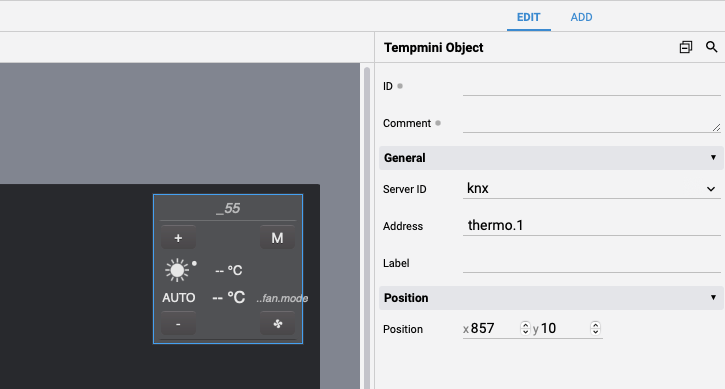
When the topology.txt configuration is complete and the KNX I/O Server is started, for each defined DPT 1 datapoint and for each light, dimmer, RGB and automation virtual datapoint a corresponding entry is automatically added to the catalog.json devices list so to be able to directly associate them to graphical objects in the Web user interface. RGB virtual datapoints are registered as dimmers, and the white channel of an RGBW light is registered as a dimmer of its own, as rgb.<n>.white; thermostats are not added to the list, as they are linked to a tempmini object instead.
In the catalog, and therefore in the User Interface, an RGB virtual datapoint is published as <r>*<g>*<b>*<on|off>, which is the format the colorpicker object reads: it shows the color of a light that is off, rather than showing it black. A light in fault carries fault as a further field. This is not the value of the rgb.<n> datapoint, which keeps reporting the color on its own. The white channel is published as <w>/255, or as off, so that a slider bound to it sits where the channel is.
This is an example of the catalog.json entries:
{
  "devices": [
    { "ioServer": "knx", "id": "light.1",  "function": "LIGHT", "type": "LIGHT",  "description": { } },
    { "ioServer": "knx", "id": "dimmer.1", "function": "LIGHT", "type": "DIMMER", "description": { } },
    { "ioServer": "knx", "id": "rgb.1",    "function": "LIGHT", "type": "DIMMER", "description": { } },
    { "ioServer": "knx", "id": "autom.1",  "function": "AUTOM", "type": "VSHUT",  "description": { } },
    { "ioServer": "knx", "id": "dpt1",     "function": "LIGHT", "type": "LIGHT",  "description": { } }
  ]
}
You should then edit the description of the devices. See catalog.json for the full structure and editing instructions.
User Interface
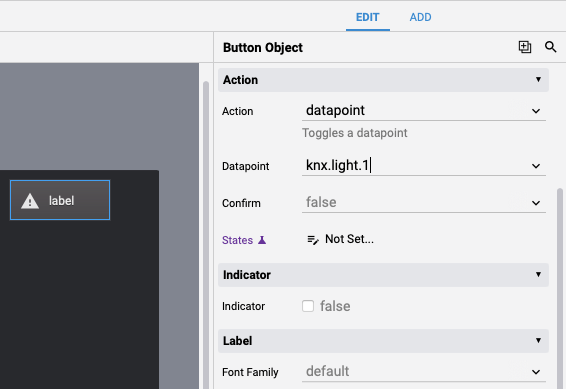
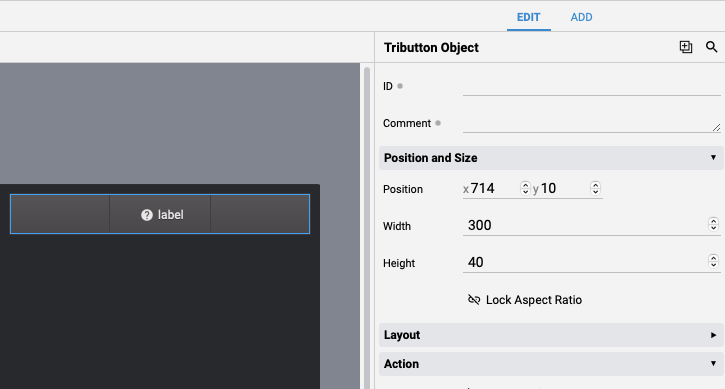
All the DPT 1 datapoints and virtual datapoints that have been defined are automatically listed in the Project Editor. DPT 1 datapoints and lights, dimmers and RGB lights can be directly linked to a button object, automations to button or 3button objects and thermostats can be controlled using a tempmini object.
To control the color of an RGB light, add a colorpicker object to your project page, set its action to datapoint and its datapoint to the corresponding rgb.<n> datapoint. Its on/off button writes on and off to the same datapoint.
<colorpicker action="datapoint" datapoint="knx.rgb.1" hsv="true" onoffbutton="true" />
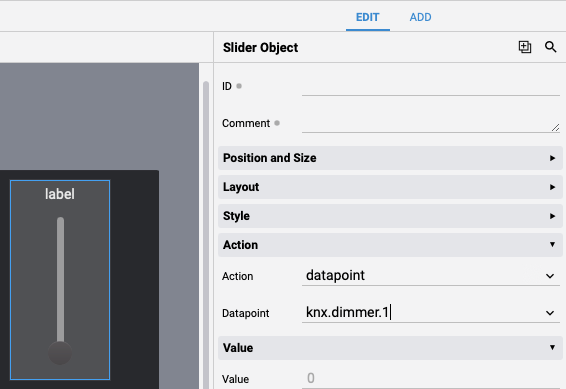
The white channel of an RGBW light is a level of its own: add a slider or a knob object, set its action to datapoint and its datapoint to the corresponding rgb.<n>.white datapoint.
Release Notes
4.2.0
- BREAKING CHANGE. Colors are now reported comma separated, as "255,0,0" rather than "255*0*0", consistently with every other I/O Server that publishes a color. This applies to the
rgb.<n>virtual datapoint and to DPT 232 and DPT 251 datapoints alike. EVENTS and user code that parsed any of them on the asterisk must be updated. Writing is unaffected: the asterisk is still accepted, along with commas, semicolons and spaces - BREAKING CHANGE.
rgb.<n>no longer reports an all zero color when the light is off: it reports the color the light is holding, whether it is on or off. EVENTS and user code that tested the color datapoint for "0*0*0" to detect an off light must read the newrgb.<n>.ondatapoint instead. Writing an all zero color to turn a light off still works, and is unchanged - RGB virtual datapoints now follow the color device behavior shared by all the I/O Servers that publish one. A light keeps its color when it is off, instead of reporting an all zero color, so the user interface can show the color it will come back to; the color and the state are set independently, and can also be set together by adding
onoroffas a last field to a color; a color of all zeros is ignored; and a write accepts commas, semicolons, asterisks or spaces as separators. See Color Devices - added the
rgb.<n>.onandrgb.<n>.faultdatapoints..faultis set while the I/O Server cannot reach the bus, and makes the user interface raise its fault flag over a light that keeps its color and its state - added support for RGBW lights: the color datapoints of an RGB virtual datapoint can be DPT 251, carrying the white channel in the color telegram, or DPT 232 with the white channel on a DPT 5 datapoint of its own, declared with the new fb.white and cmd.white attributes. The white is published on the new
rgb.<n>.whitedatapoint, a level of its own, andrgb.<n>reports it as a fourth channel. See White channel - switching on an RGB light that has no cmd.onoff command datapoint now writes the color the light was last showing, instead of a fixed white
- added support for the KNXnet/IP Routing service, with the
routing,multicastandindividualaddressI/O Server options - added support for the KNXnet/IP Secure protocol, both for secure tunneling and secure routing, with the
securemode,keyringfileandkeyringpasswordI/O Server options and the import of the ETS keyring (.knxkeys) file - added support for KNX Data Secure: group addresses that have a key in the keyring are automatically sent and received encrypted, over any connection mode
- added KNXnet/IP gateway discovery: the gateway's capabilities are detected when connecting, to automatically select plain or secure tunneling, and the new
discoverdatapoint lists all the gateways available on the network - added the import of password-protected ETS6 project files
- added the
localhostI/O Server option to bind the driver to a specific local network interface and port - added the "setpoint.mode.values" and "setpoint.mode.labels" thermostat attributes, to redefine the setpoint modes in topology.txt
- the topology.txt file is now automatically reloaded when it changes, with no need to restart HSYCO
4.1.0
- added support for datapoint types 19 to 30
4.0.1
- Minor fixes to KNX Utility
3.10.0
- improved compatibility with ETS project files
3.9.0
- added support for DPT 251 datapoints
- added support for DPT 245 datapoints
- added support for ETS6 export file
- added "decimals" I/O Server option
- import performance improvements
3.7.0
- added support for ETS5 export file
- added support for DPT 29 datapoints
- added
initreadintervalI/O Server option - minor connection handling improvements
3.5.0
- added support for DPT 232 datapoints
- added support for RGB virtual datapoints
3.4.0
- fixed value encoding error for DPT 16 datapoints
- removed
framedelayoption - improved frames confirmation handling
- improved configuration files loading
3.3.0
- added support for light virtual datapoints
3.2.1
- fixed bug on auto-discovery of AUTOM datapoints
- fixed bug on loading of datapoints’ thumbnails
3.2.0
- initial release
KNX is a registered trademark of KNX Association.