Hephais
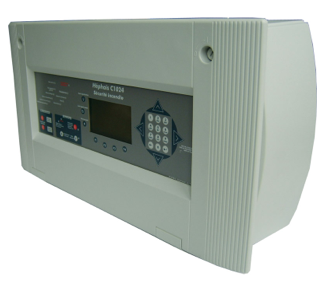
The SD3 HEPHAIS 1600 / DEF is a multi-zones fire panel. The integration with HSYCO can be accomplished via a standard Modbus RTU slave interface. This I/O Server requires HEPHAIS 1600 with protocol modbus JBUS V0.13.
Modbus Connections
The HEPHAIS 1600 has a Modbus interface.
-
Modbus address: 1 (can be set to 1 - 247)
-
RS-422 parameters:
| Baud rate | 9600 |
| Data bits | 8 |
| Stop bit | 1 |
| Parity | none |
| Flow control | none |
Refer to the HEPHAIS 1600 manuals for installation, wiring and power supply requirements.
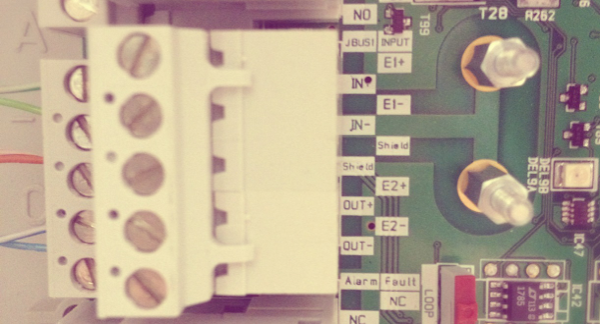
The modbus wires terminal is the Block 11. Modbus type is RS-422/JBUS (IN+/OUT+, IN-/OUT-, GND).
The Modbus-TCP/IP gateway used for the connection must support RS-422/JBUS.
HSYCO Configuration
You can define and connect more than one HEPHAIS panel on the same Modbus bus gateway or through different gateways.
Add an Hephais I/O Server in the I/O Servers section of the Settings and set its parameters:
Communication
- Comm ID: the id of the serial port, when HSYCO is wired directly to the RS-422 bus and acts as Modbus RTU master.
- IP Address and IP Port: the address of the Modbus/TCP gateway, when the panel is reached through a gateway. Leave the port blank to use the default port 502.
Set either the Comm ID or the IP address. When both are set, the Comm ID takes precedence.
High Availability
- Shutdown when inactive: defaults to false.
Options
| ID | Default | Values | Description |
|---|---|---|---|
| gui | true | true | enable support for the UI object, UISET actions and USER commands |
| false | disable UI support | ||
| startupevents | false | true | generate IO events also during the driver’s start-up phase |
| false | start generating events only after HSYCO is aligned with the current status of the system | ||
| address | 1 | 1...247 | the panel's Modbus address |
| pollinterval | 3 | n > 0 | the data acquisition interval, in seconds |
| maxpoint | m4.l2.200 | point id | id of the highest point used on the panel. The number after ‘m’ represents the number of the module, the number after ‘l’ represents the loop number of the module and the last number is the address of the point within the loop. Acceptable values range from m0.l1.1 to m9.l2.200 |
| hysteresis | 0 | <n> | if different than zero, the datapoints’ values are checked <n> times before being set. Setting this option to a value different from zero will decrease the responsiveness of the driver |
config.ini
The config.ini file is a specific configuration file located in the config/drivers/hephais/<io_server_id> directory, where <io_server_id> is the I/O Server id in lower case.
If the file does not exist when the I/O Server starts, the driver runs a discovery phase, reading the name and the zone of every point from the panel and writing the result to config.ini itself. Discovery reads one point at a time and can take several minutes on a large panel; the I/O Server only goes online when it completes. On the following start-ups the file is loaded and no discovery is performed, so you can edit it freely: delete it to force a new discovery.
Here you can define the names of the users so that they will be automatically added to the user interface. Add a new line for each user using this format:
m<m>.l<l>.<addr>.name = <name>
Add a new line to specify the zone the point belongs using this format:
m<m>.l<l>.<addr>.zone = <name>
Add a new line to define the name of a zone using this format:
z<n>.name = <name>
For instance, in config/drivers/hephais/fire/config.ini:
m1.l1.1.name = Entrance
m1.l1.1.zone = 1
m1.l1.2.name = Corridor
m1.l1.2.zone = 2

z1.name = Zone 1
z2.name = Zone 2
Datapoints
| ID | Value | R/W | Description |
|---|---|---|---|
| connection | online | R | connection established |
| offline | R | HSYCO can't connect to the panel | |
| alarm | 1 | R | fire panel in alarm |
| 0 | R | no alarm | |
| fault | 1 | R | fire panel fault |
| 0 | R | no fault | |
| oos | 1 | R | at least one point out of service |
| 0 | R | no point out of service | |
| test | 1 | R | at least one zone in test mode |
| 0 | R | no zone in test mode | |
| error.sys | 1 | R | system fault |
| 0 | R | no system fault | |
| prealarm | 1 | R | fire panel in pre-alarm |
| 0 | R | no pre-alarm | |
| techalarm | 1 | R | fire panel in technical alarm |
| 0 | R | no technical alarm | |
| sound | 1 | R | H.S. speaker active |
| 0 | R | H.S. speaker not active | |
| error.com | 1 | R | fire panel communication error |
| 0 | R | no fire panel communication error | |
| error.battery | 1 | R | fire panel battery error |
| 0 | R | no fire panel battery error | |
| error.sector | 1 | R | fire panel sector fault |
| 0 | R | no fire panel sector fault | |
| z<n>.name | <text> | R | name assigned to zone <n> |
| z<n>.alarm | 1 | R | zone <n> in alarm |
| 0 | R | zone <n> not in alarm | |
| z<n>.oos | 1 | R | zone <n> out of service |
| 0 | R | zone <n> not out of service | |
| z<n>.fault | 1 | R | zone <n> in fault |
| 0 | R | zone <n> not in fault | |
| z<n>.test | 1 | R | zone <n> in test mode |
| 0 | R | zone <n> not in test mode | |
| m<m>.l<l>.<n>.name | <text> | R | name assigned to point P of module <m> in loop <l> |
| m<m>.l<l>.<n>.oos | 1 | R | point <n> of module <m> in loop <l> out of service |
| 0 | R | point <n> of module <m> in loop <l> not out of service | |
| m<m>.l<l>.<n>.alarm | 1 | R | point <n> of module <m> in loop <l> in alarm |
| 0 | R | point <n> of module <m> in loop <l> not in alarm | |
| m<m>.l<l>.<n>.fault | 1 | R | point <n> of module <m> in loop <l> in fault |
| 0 | R | point <n> of module <m> in loop <l> not in fault | |
| m<m>.l<l>.<n>.alarm.test | 1 | R | point <n> of module <m> in loop <l> alarm test |
| 0 | R | point <n> of module <m> in loop <l> not in alarm test | |
| m<m>.l<l>.<n>.prealarm | 1 | R | point <n> of module <m> in loop <l> prealarm |
| 0 | R | point <n> of module <m> in loop <l> not in prealarm | |
| m<m>.l<l>.<n>.techalarm | 1 | R | point <n> of module <m> in loop <l> techalarm |
| 0 | R | point <n> of module <m> in loop <l> not in techalarm |
User Interface
UISET Actions
| ID | Attribute | ||
|---|---|---|---|
| connection.label.online | visible | true | when datapoint connection = online |
| false | when datapoint connection = offline | ||
| connection.label.offline | visible | true | when datapoint connection = offline |
| false | when datapoint connection = online | ||
| alarm.label.1 | visible | true | when the fire panel is in alarm |
| false | when the fire panel is not in alarm | ||
| alarm.label.0 | visible | true | when the fire panel is not in alarm |
| false | when the fire panel is in alarm | ||
| fault.label.1 | visible | true | when the fire panel is in fault |
| false | when the fire panel is not in fault | ||
| fault.label.0 | visible | true | when the fire panel is not in fault |
| false | when the fire panel is in fault | ||
| oos.label.1 | visible | true | when at least one point is out of service |
| false | when no one of the points is out of service | ||
| oos.label.0 | visible | true | when no one of the points is out of service |
| false | when at least one point is out of service | ||
| test.label.1 | visible | true | when at least one zone is in test mode |
| false | when there aren't zones in test mode | ||
| test.label.0 | visible | true | when there aren't zones in test mode |
| false | when at least one zone is in test mode | ||
| error.sys.label.1 | visible | true | when there is a system fault |
| false | when there is not a system fault | ||
| error.sys.label.0 | visible | true | when there is not a system fault |
| false | when there is a system fault | ||
| prealarm.label.1 | visible | true | when the fire panel is in pre-alarm |
| false | when the fire panel is not in pre-alarm | ||
| prealarm.label.0 | visible | true | when the fire panel is not in pre-alarm |
| false | when the fire panel is in pre-alarm | ||
| alarm.tec.label.1 | visible | true | when the fire panel is in technical alarm |
| false | when the fire panel is not in technical alarm | ||
| alarm.tec.label.0 | visible | true | when the fire panel is not in technical alarm |
| false | when the fire panel is in technical alarm | ||
| sound.label.1 | visible | true | when H.S. sound speaker is active |
| false | when H.S. sound speaker is not active | ||
| sound.label.0 | visible | true | when H.S. sound speaker is not active |
| false | when H.S. sound speaker is active | ||
| error.com.label.1 | visible | true | when there is a communication fault |
| false | when there is not a communication fault | ||
| error.com.label.0 | visible | true | when there is not a communication fault |
| false | when there is a communication fault | ||
| error.battery.label.1 | visible | true | when there is a battery fault |
| false | when there is not a battery fault | ||
| error.battery.label.0 | visible | true | when there is not a battery fault |
| false | when there is a battery fault | ||
| error.sector.label.1 | visible | true | when there is a sector error |
| false | when there is not a sector error | ||
| error.sector.label.0 | visible | true | when there is not a sector error |
| false | when there is a sector error | ||
| z<n>.alarm.label.1 | visible | true | when the zone <n> is in alarm |
| false | when the zone <n> is not in alarm | ||
| z<n>.alarm.label.0 | visible | true | when the zone <n> is not in alarm |
| false | when the zone <n> is in alarm | ||
| z<n>.oos.label.1 | visible | true | when the zone <n> is out of service |
| false | when the zone <n> is not out of service | ||
| z<n>.oos.label.0 | visible | true | when the zone <n> is not out of service |
| false | when the zone <n> is out of service | ||
| z<n>.fault.label.1 | visible | true | when the zone <n> is in fault |
| false | when the zone <n> is not in fault | ||
| z<n>.fault.label.0 | visible | true | when the zone <n> is not in fault |
| false | when the zone <n> is in fault | ||
| z<n>.test.label.1 | visible | true | when the zone <n> is in test |
| false | when the zone <n> is not in test | ||
| z<n>.test.label.0 | visible | true | when the zone <n> is not in test |
| false | when the zone <n> is in test | ||
| z<n>.name | value | the name assigned to zone <n> |
The same .label.1 / .label.0 pair is also generated for every point, and the point's name is published as a value:
| ID | Attribute | ||
|---|---|---|---|
| m<m>.l<l>.<n>.name | value | the name assigned to the point | |
| m<m>.l<l>.<n>.oos.label.1 | visible | true | when the point is out of service |
| false | when the point is not out of service | ||
| m<m>.l<l>.<n>.oos.label.0 | visible | true | when the point is not out of service |
| false | when the point is out of service | ||
| m<m>.l<l>.<n>.alarm.label.1 | visible | true | when the point is in alarm |
| false | when the point is not in alarm | ||
| m<m>.l<l>.<n>.alarm.label.0 | visible | true | when the point is not in alarm |
| false | when the point is in alarm | ||
| m<m>.l<l>.<n>.fault.label.1 | visible | true | when the point is in fault |
| false | when the point is not in fault | ||
| m<m>.l<l>.<n>.fault.label.0 | visible | true | when the point is not in fault |
| false | when the point is in fault | ||
| m<m>.l<l>.<n>.alarm.test.label.1 | visible | true | when the point is in alarm test |
| false | when the point is not in alarm test | ||
| m<m>.l<l>.<n>.alarm.test.label.0 | visible | true | when the point is not in alarm test |
| false | when the point is in alarm test | ||
| m<m>.l<l>.<n>.prealarm.label.1 | visible | true | when the point is in pre-alarm |
| false | when the point is not in pre-alarm | ||
| m<m>.l<l>.<n>.prealarm.label.0 | visible | true | when the point is not in pre-alarm |
| false | when the point is in pre-alarm | ||
| m<m>.l<l>.<n>.techalarm.label.1 | visible | true | when the point is in technical alarm |
| false | when the point is not in technical alarm | ||
| m<m>.l<l>.<n>.techalarm.label.0 | visible | true | when the point is not in technical alarm |
| false | when the point is in technical alarm |
USER Commands
These commands drive the points and zones lists of the hephais UI object. They are handled per web session: a sort order other than num is remembered for 30 minutes, then the session is reset to the default sort.
| Name | Param | Action |
|---|---|---|
| sort.points | num, alarm, oos, fault, test | sort the points list by number, or by the most recent alarm / out of service / fault / test event |
| sort.zones | num, alarm, oos, fault, test | sort the zones list by number, or by the most recent alarm / out of service / fault / test event |
| zones.list | <n> | filter the points list, showing only the points that belong to zone <n> |
| points.list | <n> | clear the points list selection |
Hephais UI Object
The user interface for the Hephais I/O Server:
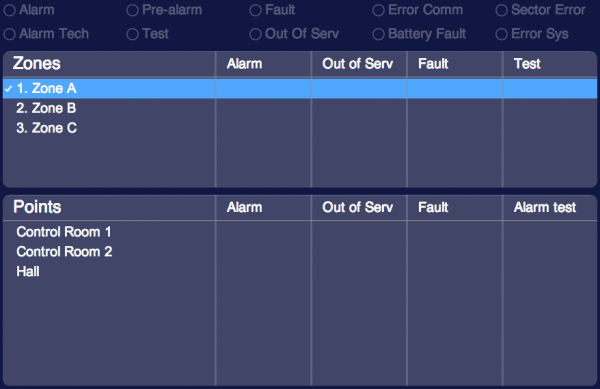
The hephais object is listed in the Project Editor’s new object list only when at least one Hephais I/O Server is defined
Parameters
- server id: the server ID.
- position: the object's position. Use the pixels or rows and columns coordinates format
Release Notes
4.2.0
- a Modbus/TCP gateway is now reached by setting its IP address and port directly on the I/O Server. A MODBUSTCP I/O Server can no longer be selected as the Comm ID, which is now only used when HSYCO is wired to the RS-422 bus: existing I/O Servers configured that way have to be reconfigured with the gateway's address and port
3.8.0
- pre-alarm and tech alarm support
- perfomance improvements
3.3.0
- initial release
SD3 and HEPHAIS are registered trademarks owned by SD3.