Enttec
Enttec DMX USB PRO is a USB DMX adapter that allows HSYCO to control any DMX-512 standard bus.
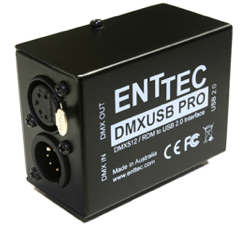
This device connects to a USB port on HSYCO Server, and is powered through the USB, so there is no need for an external power supply.
The circuitry implements 1500 V full electrical isolation (data and power lines) to protect the HSYCO Server from surges.
HSYCO supports the DMX out port only.
Each ENTTEC I/O Server controls one DMX universe. Add one I/O Server for each adapter.
Check the ENTTEC site for additional information.
Up to HSYCO 4.1, DMX gateways were configured in a dedicated DMX section and controlled through the DMX EVENTS keyword and the dmxSet() family of methods. From 4.2.0 they are standard I/O Servers with standard datapoints, and the previous configuration, keywords and APIs have been removed. See Migrating from the DMX gateways below.
Connections
The ENTTEC DMX USB PRO connects to HSYCO using a USB port with the FTDI virtual com driver.
The device driver will assign a serial port, with a name that depends on the operating system and the presence of virtual com devices on other USB ports.
You can connect multiple ENTTEC DMX USB PRO devices or other DMX controllers to an HSYCO Server.
HSYCO Running on Linux
The FTDI driver is already present on HSYCO's standard Ubuntu-based distribution.
Simply connect the ENTTEC DMX USB PRO to a USB port on HSYCO Server and look in the /var/log/syslog file to find the serial device name assigned to the device.
You should see something like this:
Jul 25 12:22:07 hsycoserver kernel: [1206668.247487] usb 2-1: FTDI USB Serial Device converter now attached to ttyUSB0
In this case the port name is ttyUSB0. You should expect this to be the name that is assigned in most cases if there are no other devices attached to the USB ports.
HSYCO Running on Mac OS X
On Mac OS X you will have to install the FTDI Virtual COM (VCP) driver. You can download the appropriate driver from FTDI's drivers page, then follow the installation instructions for Mac OS X.
Once the driver is installed, and the device connected to a USB port, the driver will assign a port name that contains part of the device's serial number, so it should be quite easy to find. Look at the files in the /dev directory, and you should see something like this:
crw-rw-rw-  1 root  wheel   18,  49 Jul 25 13:06 /dev/cu.usbserial-EN099618
crw-rw-rw-  1 root  wheel   18,  48 Jul 25 13:06 /dev/tty.usbserial-EN099618
You can simply use the last part of the name, 099618 in this case, to configure the port name in System Settings.
HSYCO Configuration
Define a comm port for the adapter in the Comm Ports section of the Settings, then add an ENTTEC I/O Server in the I/O Servers section and select that comm port.
Unlike previous releases, the ENTTEC adapter now requires an explicit comm port definition, like every other serial I/O Server. The adapter handles DMX timing itself and ignores the line speed, so the parameters can be left at 0,8,1,0,0, which leaves the port settings untouched.
Communication
- Comm Port: the comm port the adapter is connected to
High Availability
- Shutdown when inactive: defaults to true.
Options
| ID | Default | Values | Description |
|---|---|---|---|
| channels | 512 | 1 ... 512 | number of channels of this universe. Reducing it shortens every frame, which can be useful on a lightly populated bus |
| refreshmillis | 1000 | 100 ... 10000 | milliseconds between two consecutive refresh frames when nothing is changing. A change is always sent immediately, so this only sets how often the bus is refreshed while idle |
| discovery | true | true | datapoints are automatically added to the list of detected devices in the catalog.json file as DIMMER devices, so that they can be picked in the Project Editor and drive sliders, knobs and colorpickers |
| false | datapoints are published but not added to the catalog |
Datapoints
DMX channels only become datapoints when you use them: a datapoint is created the first time it is written, or the first time it is refreshed. Datapoints are not persisted, so after a restart a channel is unknown again until it is written or refreshed.
| ID | Value | R/W | Description |
|---|---|---|---|
| connection | online | R | the comm port is open and the last frame was written |
| offline | R | the last frame could not be written | |
| <channel> | 0 ... 255 | RW | one DMX channel, from 1 to the configured number of channels |
| rgb.<channel> | <r>,<g>,<b> | RW | three consecutive channels, starting at <channel> |
| range.<low>.<high> | see below | RW | every channel from <low> to <high>, inclusive |
The DMX USB PRO does not acknowledge what it receives, so connection reports no more than an open port and a write that did not fail. It is not a confirmation that the bus is being driven.
Writing values
Every channel, rgb and range datapoint accepts the same set of values. N is the number of channels the datapoint spans: 1 for a channel, 3 for an rgb, and high - low + 1 for a range.
| Value | Description |
|---|---|
| 0 ... 255 | a channel level. When the datapoint spans more than one channel, the same level is set on all of them |
| <n>/<m> | a fraction of full output, for example 128/255 or 3/4 |
| <n>% | a percentage of full output, for example 50% |
| a list of N values | one level per channel, in order. Any of the formats above can be used for each element |
| on | restores the level each channel had before it was last taken to zero |
| off | sets every channel to zero, remembering the level it had |
| flip | toggles: see on, off and flip below |
| refresh | publishes every datapoint of this I/O Server again |
Values in a list can be separated by a comma, a semicolon, a space or an asterisk, so 255,128,0, 255;128;0, 255 128 0 and 255*128*0 are all the same command. A value that cannot be parsed, or a list whose length is neither 1 nor N, is rejected with an error in the log and changes nothing; it does not create the datapoint either.
IO dmx2.10 = 200
IO dmx2.10 = 78%
IO dmx2.rgb.20 = 255,128,0
IO dmx2.range.1.24 = off
IO dmx2.range.1.24 = FLIP
Reading values
A channel datapoint reads back as its level, from 0 to 255.
An rgb datapoint reads back as <r>,<g>,<b>.
A range datapoint reads back as a single level when every channel in it holds the same value, and as a comma-separated list of N levels when they differ.
In the catalog, and therefore in the User Interface, values are published in the <level>/255 fractional format, or as off at zero, so that sliders and knobs show the correct position without any conversion. An rgb datapoint is published as <r>*<g>*<b>, which is the format the colorpicker object reads. A range holding different levels has no single level the GUI could show, so it is published as unknown.
On, off and flip
Each channel remembers the last level it held before going to zero. on restores that level, and off saves it. A channel that has never been dimmed remembers 255, so on on a fresh channel gives full output. The level is remembered whatever took the channel to zero, so dmx2.10 = 0 followed by dmx2.10 = on also restores it.
flip on a datapoint spanning more than one channel follows a three-state rule:
- if any channel is on, every channel is set to zero
- otherwise, if any channel has a remembered level, every channel is restored to its own remembered level
- otherwise every channel is set to 255
Overlapping datapoints
Channels, not datapoints, hold the state, so several datapoints can address the same channel and they always agree. When a write changes a channel, every datapoint that covers that channel is published again.
For example, with dmx2.range.1.10, dmx2.rgb.4 and dmx2.5 all in use, writing dmx2.5 = 200 also updates the range and the rgb datapoint, and each of them fires its own IO event.
Channel levels at start-up
The DMX USB PRO has no read-back, so this driver cannot ask the adapter what the bus is holding.
- when HSYCO starts, every channel is preset to zero and the first frame drives the bus to zero
- if the I/O Server is stopped and started again while HSYCO keeps running, the channel levels are retained and driven back out
refresh is accepted so that the same project logic works against either DMX gateway, but on this adapter it can only publish the levels the driver already holds. It never reads the hardware.
User Interface
Use the standard datapoint-driven objects:
- slider and knob: set action to
datapoint, the datapoint to a channel or range datapoint, and the range to0,255 - colorpicker: set action to
datapointand the datapoint to anrgb.<channel>datapoint - button: set action to
datapointand use theon,offandflipvalues
<colorpicker action="datapoint" datapoint="dmx2.rgb.10" hsv="true" onoffbutton="true" />
Migrating from the DMX gateways
The dmxServers, dmxServersIP, dmxServersPort, dmxServersComm and dmxServersId parameters are no longer read. Replace each gateway with an ENTTEC I/O Server, then re-point projects, EVENTS and user code at the new datapoints.
| Removed | Replacement |
|---|---|
DMX 10 = 200 | IO dmx2.10 = 200 |
DMX 10 = ON / OFF / FLIP | IO dmx2.10 = on / off / flip |
DMX 100-120 = ON | IO dmx2.range.100.120 = on |
DMX 1010 = 200 (second gateway) | IO dmx3.10 = 200, with an I/O Server per universe |
DMX 10 as a trigger | IO dmx2.10 as a trigger |
DMXSTART | IOSTART dmx2, or the dmx2.connection datapoint |
dmxSet(10, 200) | ioSet("dmx2.10", "200") |
dmxOn(10) / dmxOff(10) | ioSet("dmx2.10", "on") / ioSet("dmx2.10", "off") |
dmxGet(10) | ioGet("dmx2.10") |
DmxEvent(channel, state) | IOEvent(name, value) |
DmxStartupEvent(index) | IOStartupEvent(index) |
<colorpicker action="dmx" dmxaddress="10"> | <colorpicker action="datapoint" datapoint="dmx2.rgb.10"> |
The channel address no longer carries the gateway number: each universe is a separate I/O Server with its own ID, and channels are always 1 to 512.
The adapter also now needs an explicit comm port definition, where previously the serial device name was entered directly in the DMX section.
DMX channel merging and the DmxFilter callback have been removed and have no replacement.
An I/O Server whose ID starts with dmx is matched by an existing deny; *; *; *; dmx* rule in acl.ini, which used to apply to the retired DMX web commands. Check the Access Control List after adding the I/O Servers, and remove or narrow that rule.
Release Notes
4.2.0
- ENTTEC adapters are now standard I/O Servers, with datapoints for single channels, rgb triplets and channel ranges
- the adapter now requires an explicit comm port definition
- channel value filtering removed
3.1.0
- initial release
ENTTEC is a registered trademark of ENTTEC Pty Ltd. FTDI is a registered trademark of Future Technology Devices International Ltd.