Boschfpa
The BOSCH FPA-5000 is a modular fire panel system.
This I/O server requires the FPA firmware version 2.12.7 or later.
Communication
Be sure to use BOSCH sofware management tool RPS version 4_0_11 or later for the FPA configuration.
Configure the RS-232 Communication Module module as follows:
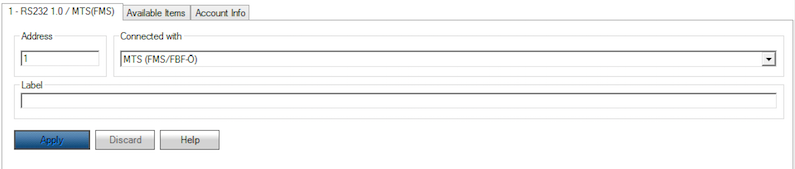
After the upload configuration process the FPA-5000 is ready to be connected via RS-232.
RS-232 Communication Module overview:
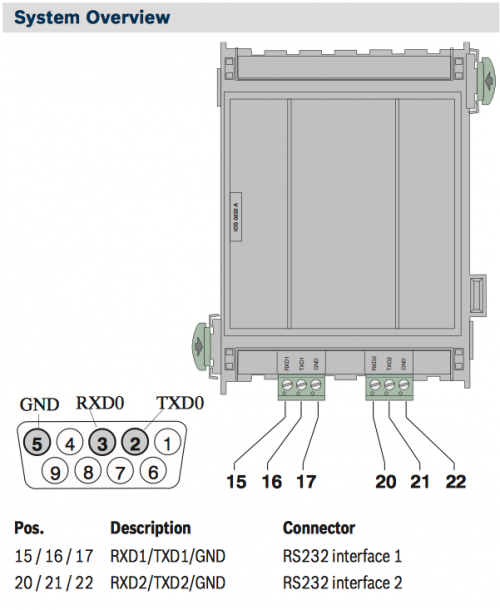
RS-232 parameters:
| Baud rate | 9600 |
| Data bits | 7 |
| Stop bit | 1 |
| Parity | even |
| Flow control | none |
HSYCO Configuration
Add a BOSCHFPA I/O Server in the I/O Servers section of the Settings and set its parameters:
Communication
- Comm ID: select the comm port connected to the panel.
High Availability
- Shutdown when inactive: defaults to true.
Options
| ID | Default | Values | Description |
|---|---|---|---|
| gui | true | true | enable support for the UI (event log object) |
| false | disable UI support | ||
| language | system language | en | language of log and display messages. Supported values are English, Italian and German |
| it | |||
| de | |||
| logsize | 100 | n ≥ 0 | the number of log lines to display in the UI object |
config.ini
The config.ini file is an optional configuration file located in the config/drivers/boschfpa/<io_server_id> directory, where <io_server_id> is the I/O Server id in lower case, and used to define zones (lines) names. If defined, these names will be used instead of the original <logical address>.<subaddress> format in the log files and GUI event log object.
Changes to the config.ini file are automatically detected and don't require a restart to become effective.
This file is case sensitive.
For each zone (line), enter a line formatted as:
line.<logical address>.<subaddress> = <name>
For instance, in config/drivers/boschfpa/fpa/config.ini:
line.3.1 = DATA ROOM SENSOR
line.4.1 = GENERATORS ROOM
Datapoints
| ID | Value | R/W | Description |
|---|---|---|---|
| connection | online | R | connection established |
| offline | R | HSYCO can't connect to the panel | |
| buzzer | off | R | buzzer silenced (forced event) |
| W | silence the buzzer | ||
| line.<logical address>.<subaddress> | bypass | R | bypass |
| blocked | R | blocked | |
| warningthreshold | R | threshold warning | |
| tamper | R | tamper alarm | |
| alarminvestigation | R | alarm verification | |
| invalid | R | invalid | |
| fire | R | fire | |
| fireprealarm | R | fire pre-alarm | |
| firedaymode | R | fire day mode | |
| normal | R | normal | |
| fault | R | fault | |
| troublelight | R | minor fault | |
| supervisorymonitorwater | R | supervisory, monitor, water | |
| off | R | off | |
| on | R | on | |
| paperout | R | out of paper | |
| powerfail | R | power fail | |
| activated | R | activated | |
| pollution | R | heavy contamination | |
| pollutionlight | R | minor contamination | |
| walktestfire | R | walk test fire | |
| walktestnormal | R | walk test normal | |
| walktesttrouble | R | walk test fault | |
| walktestoff | R | walk test off | |
| walkteston | R | walk test on | |
| walktestactivation | R | walk test activation | |
| status.bypass status.blocked status.warningthreshold status.tamper status.alarminvestigation status.invalid status.fire status.fireprealarm status.firedaymode status.normal status.trouble status.troublelight status.supervisorymonitorwater status.off status.on status.paperout status.powerfail status.activated status.pollution status.pollutionlight status.walktestfire status.walktestnormal status.walktesttrouble status.walktestoff status.walkteston status.walktestactivation | 1 | R | one or more lines in this state |
| 0 | R | no lines in this state |
User Interface
UISET Actions
| ID | Attribute | |
|---|---|---|
| logs | value | the latest entries of the security log (as many as specified in hsyco.ini) |
Log Files
A permanent record of all the events shown in the log page is saved in a file called security.log in the logs/YYYY directory for the current year.
This file is never overwritten or deleted by HSYCO.
2014.07.10 17:27:24.873 - fpa - fault: 2451.0
2014.07.10 17:27:46.813 - fpa - fire: data room sensor
2014.07.10 17:27:48.851 - fpa - activated: 1603.1
2014.07.10 17:27:54.002 - fpa - activated: 1602.1
2014.07.10 17:27:54.924 - fpa - activated: 1601.1
2014.07.10 17:28:10.609 - fpa - normal: data room sensor
2014.07.10 17:28:11.603 - fpa - normal: 2451.0
Other information related to the BOSCH FPA driver may be saved in the daily message.log files.
Release Notes
4.2.0
- the
languageoption now acceptsenfor English. It used to be reported as a format error and fall back to the system language
3.4.0
- initial release
FPA-5000 is a registered trademark of Bosch Security Systems.