Introduction to JavaScript Programming
HSYCO integrates a JavaScript interpreter, allowing you to embed JavaScript code in the EVENTS files.
There are two ways to embed JavaScript in events: using JavaScript actions and with JavaScript callbacks.
JavaScript actions
Actions can be directly implemented in JavaScript, using curly brackets to enclose JavaScript code:
event : { /* JavaScript Code here */ }
When the event is triggered, HSYCO will execute the JavaScript code enclosed in the brackets.
The basic action format and the JavaScript action format are exclusive and cannot be mixed after the colon. It is of course possible to define two distinct event:action rules, using the same event, one with standard actions and the other with embedded JavaScript.
The code can be written on multiple lines, only the opening bracket needs to be in the same line of the event section, for example:
TIME : {
	//  JavaScript Code here
}
The syntax highlighter and integrated syntax error viewer are also available for JavaScript. When you save an EVENTS file from the editor, the file is parsed and all JavaScript code is interpreted. Syntax errors, including calling functions that are not defined, are reported in the error viewer, and also logged in the log file.
In the following example, at line 3, we are referencing a JavaScript function that doesn’t exist. We also have another error at line 6, where the open curly bracket is missing from the action.
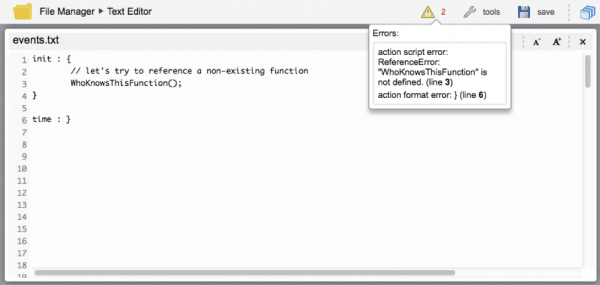
Coding JavaScript actions
The code you can write in actions is standard JavaScript. Because the interpreter is fully embedded in the HSYCO Java core, you also have access to the standard Java classes and, most importantly, to the HSYCO’s Java commands and utility methods, with only minor differences and a few limitations related to the differences in data types between JavaScript and Java languages.
In the following example, when the I/O data point k36 goes to 1, the I/O data point k.37, a dimmer in this case, will step from 10% to 100% in 10% increments every 400 milliseconds:
io k.36 = 1 : {
 	for (i = 10; i <= 100; i += 10) {
 		ioSet('k.37', i);
 		sleep(400);
 	}
 }
As you can see we have combined standard JavaScript features, like the for loop, with HSYCO’s command APIs, the ioSet() and sleep() methods, to create a simple JavaScript action and associate it to a specific event.
You can directly use Java classes too, for example:
time = 0000 : {
 	(new java.io.File("myfile.txt")).renameTo(new java.io.File("myfile_backup.txt"));
 }
Here we are using the File class, in the java.io package, to rename a file every day at midnight.
Here is another, slightly more complex example, creating a JavaScript function to append text strings to an arbitrary file:
init : {

  function fileLog(fileName, text) {
        var date = new java.text.SimpleDateFormat("yyyy-MM-dd hh:mm:ss").format(java.util.Calendar.getInstance().getTime());
        var writer = new java.io.BufferedWriter(new java.io.FileWriter(fileName, true));
        writer.write(date + " " + text);
        writer.newLine();
        writer.close();
    }
}
Comments in the JavaScript code
You can use the normal JavaScript comment formats. Single line comments start with // and multi line comments start with /* and end with */.
Because the EVENTS parser is also run on JavaScript code, you can also use the # character to mark text as comment until the end of the line is reached.
As with the standard EVENTS syntax, if you need to use the # character in JavaScript strings, you should use double quotes, not single quotes, to delimit the string containing # characters.
JavaScript code errors checking
The EVENTS parser is able to report syntax errors in the embedded JavaScript code. If errors are detected, the whole event:action rule is not loaded in the EVENTS engine, to avoid run-time errors.
To perform these checks, the parser needs to perform a dummy run of all JavaScript code every time an EVENTS file is loaded.
In the previous file rename example, the file would actually be renamed not only at midnight, but also every time EVENTS files are reloaded.
During the test run, all calls to HSYCO methods are automatically skipped, and JavaScript variables are segregated in a dedicated test namespace, but any other native Java or JavaScript command will execute as if the event was triggered at run-time. To avoid unwanted execution of arbitrary JavaScript code that could create undesirable effects if executed during code checking when an EVENTS file is loaded, you can check the __run predefined JavaScript variable, that is set to 0 when code is test run, and to 1 when executed on proper events.
Note that this conditional execution based on testing __run == 1 has the effect that all code that will be skipped by the test, will also not be checked at all, so it should only be used when strictly necessary.
A safe file rename example would be:
time = 0000 : {
 	if (__run == 1) {
 		(new java.io.File("myfile.txt")).renameTo(new java.io.File("myfile_backup.txt"));
 	}
 }
Infinite loops in code, or JavaScript code that runs for a very long time are handled in a special way in HSYCO. When EVENTS files are saved, If any code section takes more than 20 seconds to execute during the test run, HSYCO will abort the JavaScript engine, rename the original file with the _unsafe.txt suffix and, a few seconds later, will restart the whole HSYCO server engine to protect the integrity of the system.
An error message will be visible in the editor, before HSYCO restarts.
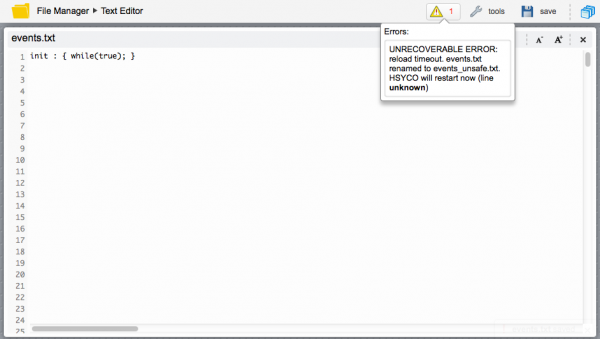
The EventsLoadTimeout parameter in the general system configuration parameters of Settings allows you to change the default 20 seconds timeout.
Predefined variables
Besides __run, there are a few other predefined variables that you can use at run-time: triggerKey, triggerValue and sessionId.
triggerKey and triggerValue contain the internal representation of the event’s trigger keyword and value that caused the execution of the JavaScript action. These variables could be quite useful when you want to execute code that needs to know which specific event caused its execution, for example when you have a complex event expression, that could be triggered by different events.
We are not documenting the returned values for these variables, but you can easily find out with a single line of code:
... : { messageLog(triggerKey + "/" + triggerValue + ".") }
sessionId returns the internal representation of the Web client session on events like USER and PAGE. You can use the sessionId value directly to set session-specific user interface attributes.
The INIT JavaScript scope
JavaScript code that is associated to the INIT event keyword is different from code associated to any other event, as it is executed in a global scope that is shared with all other JavaScript segments. In more practical terms, if you need to define JavaScript functions or variables that will be used in other JavaScript actions, you should define them in one or more JavaScript actions directly associated to the INIT event, like in the following example:
INIT : {
	var counter = 0;

	function myLog(text) {
		messageLog(text);
	}
}

TIME : {
	counter++;
	myLog("My Counter is: " + counter);
}
All JavaScript code in the same EVENTS file shares and has unrestricted access to this single global scope. Global variables can be read and written from any JavaScript segment, and keep their value between one execution and the next.
Check the log file, and you will see something like:
2014.01.24 15:41:00.519 - My Counter is: 1
2014.01.24 15:42:00.497 - My Counter is: 2
2014.01.24 15:43:00.498 - My Counter is: 3
Note that the INIT scope is bound to each file: variables and functions defined in the INIT section or sections of an events file are only accessible from JavaScript code in the same file.
Local variables and parameters
The parameters of callback functions, the predefined variables triggerKey, triggerValue and sessionId, and the variables declared with var inside a function or a JavaScript action are local to each execution. Assigning them has no effect outside that execution, and the next execution receives its own values. A parameter or local variable with the same name as a global variable hides the global variable inside that function or action, without changing it.
function IOEvent(name, value) : {
	if (value == "on") {
		value = "100";	// changes this execution's value only
	}
}
Always declare the variables of a function or JavaScript action with var. Assigning a value to a name that isn't declared creates a global variable, shared by all the JavaScript code in the same EVENTS file. Events are executed concurrently, so two executions of the same code can overwrite each other's values.
function IOEvent(name, value) : {
	target = name + ".out";	// wrong: target is a global variable, shared by concurrent events
	ioSet(target, value);
}
function IOEvent(name, value) : {
	var target = name + ".out";	// right: target is local to this execution
	ioSet(target, value);
}
For the same reason, a global variable updated by events that can run at the same time, like counter++ in the example above, is not protected against concurrent updates.
JavaScript Reserved Words
The following are keywords and may not be used as variables, functions, methods, or object identifiers, because ECMAScript specifies special behavior for them:
- break
- case
- catch
- continue
- debugger
- default
- delete
- do
- else
- finally
- for
- function
- if
- in
- instanceof
- new
- return
- switch
- this
- throw
- try
- typeof
- var
- void
- while
- with
Words reserved for possible future use
The following are reserved as future keywords by the ECMAScript specification. They have no special functionality at present, but they might at some future time, so they cannot be used as identifiers.
Although some of the following keywords may be used in the current release of the JavaScript engine embedded in HSYCO, we recommend to avoid using any of these to avoid issues with future releases of the HSYCO Server.
List of future keywords, defined in ECMAScript 1:
- const
- enum
- export
- extends
- import
- super
List of future keywords, defined in ECMAScript 2:
- abstract
- boolean
- byte
- char
- class
- const
- double
- enum
- export
- extends
- final
- float
- goto
- implements
- import
- int
- interface
- long
- native
- package
- private
- protected
- public
- short
- static
- super
- synchronized
- throw
- throws
- transient
- volatile
List of future keywords, defined in ECMAScript 3:
- abstract
- boolean
- byte
- char
- class
- const
- double
- enum
- export
- extends
- final
- float
- goto
- implements
- import
- int
- interface
- long
- native
- package
- private
- protected
- public
- short
- static
- super
- synchronized
- throws
- transient
- volatile
List of future keywords, defined in ECMAScript 5:
- class
- enum
- export
- extends
- implements
- import
- interface
- let
- package
- private
- protected
- public
- static
- super
- yield
Reserved word usage
In order to call methods of Java classes having the same name of reserved keywords, you can use a notation that refers to the name as "IdentifierNames", avoiding conflict with reserved keywords. For example, to call the delete method of a Java File object, you should use the following notation:
var myfile = new java.io.File("logs/myfile.txt");
myfile['delete']();
JavaScript callbacks
You can also associate JavaScript actions directly to specific event callback functions. This method offers more control and flexibility over the basic event:action syntax. The JavaScript callbacks are equivalent to the Java callbacks, providing full access to all core events in pure JavaScript.
The JavaScript callback/action syntax in EVENTS is:
function f(p) : { /* JavaScript Code here */ }
where f(p) is one of the callback functions with its parameters. The parameters’ names in the callback declaration are available as variables in the JavaScript action code.
This syntax is quite similar to what a normal function declaration in JavaScript would be, just with the added colon character between the function’s parameter’s list and the function’s code.
This is not standard JavaScript syntax, but a specific way in HSYCO to associate a callback with JavaScript code. The standard JavaScript code is only the part enclosed between curly braces after the colon.
Just like ordinary functions, if the JavaScript action code is associated to a callback function and not to a basic event, you are allowed to use the return statement to return a value to the HSYCO event engine. Some callbacks will need return values to implement specific features. For example:
function WebRootRequestEvent(addr, secure, useragent) : {
 	return "hsycoserver/manager";
 }
This code will redirect root HTTP requests received by the HSYCO server to the manager page. In fact the WebRootRequestEvent() callback is called on every HTTP request received by the HTTP server, and takes an optional return value as the redirection URL.
You can define multiple JavaScript functions for the same callback in the same EVENTS file or different files, but execution order is not guaranteed. If the functions return a value, only the first not null value returned is used as the event return value.