HwgIO
The HW group I/O Controller 2 is a general purpose digital input-output Ethernet controller, with 8 inputs and 8 outputs.
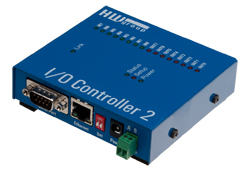
This I/O Server also supports the legacy PortBox, ER84 and ER88 conrollers.
HSYCO Configuration
Add an HWGIO I/O Server in the I/O Servers section of the Settings and set its parameters:
Communication
- IP Address: host name or IP address of the I/O Controller
- IP Port: TCP/IP port to use, leave blank to use default port 23.
High Availability
- Shutdown when inactive: defaults to true (the I/O Controller only accepts one connection and can't be accessed by two HSYCO servers simultaneously).
Options
There are no available configuration options for the HWGIO I/O Server.
I/O Controller Configuration
TCP/IP mode needs to be configured and NVT (Network virtual terminal) enabled in order to work with the digital inputs and outputs.
Refer to the I/O Controller manual for detailed configuration information.
Datapoints
The data points associated to the input pins are named i1 to i8.
The data points associated to the output pins are named o1 to o8.
The I/O Server generates asynchronous events based on the status of the I/O Controller's input and output pins. The output data points can be written to control the output pins.
| ID | Value | R/W | Description |
|---|---|---|---|
| i<n> | 0 | R | input <n> is low |
| 1 | R | input <n> is high | |
| o<n> | 0 | R | output <n> is low |
| W | set output <n> to off | ||
| 1 | R | output <n> is high | |
| W | set output N to on |
Release Notes
3.0.1
- Fixed a bug that could block the update of the systemtopo.txt file at start-up.
2.8.3
- Support of the serial port in HWg I/O Controller.
2.8.0
- Initial support.
HWg is a registered trademark of HW group s.r.o.